As a workaround for the Trace tool not honoring feature selections, I am trying the following:
1. In Pro 2.6, select the junction feature I'm interested in.
2. Export the feature to a new feature class named Flag in my default geodatabase. Note that my trace network is in another geodatabase.
3. Clear the selection.
4. Run an upstream trace, using Flag as the Starting Points with all other parameters at defaults.
However, in addition to the expected upstream edges, the resulting feature selection includes the edge just downstream of the junction (orange circle in image below).
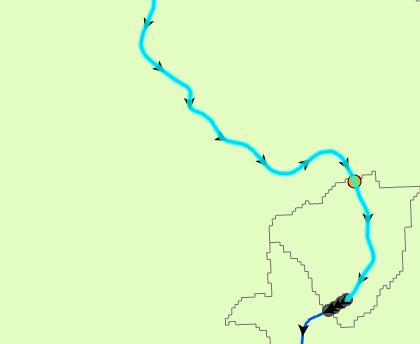
When I instead use the ribbon to interactively set a starting point at the desired junction (I made sure it snapped to that junction feature before clicking), and then run an upstream trace (initiated from the ribbon, so it's using the TN_Temp_Starting_Points and all defaults), I get the desired result, which is just the upstream set of edges.
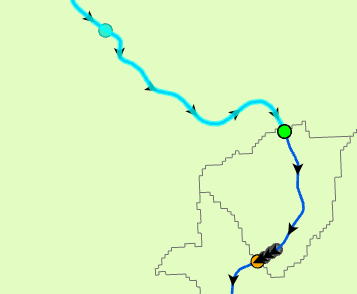
Why is my exported junction causing a downstream edge to be returned from an upstream trace?
Note that interactively setting starting points isn't an option for me, because I'm trying to automate this for thousands of junctions via ModelBuilder.


