Hi All
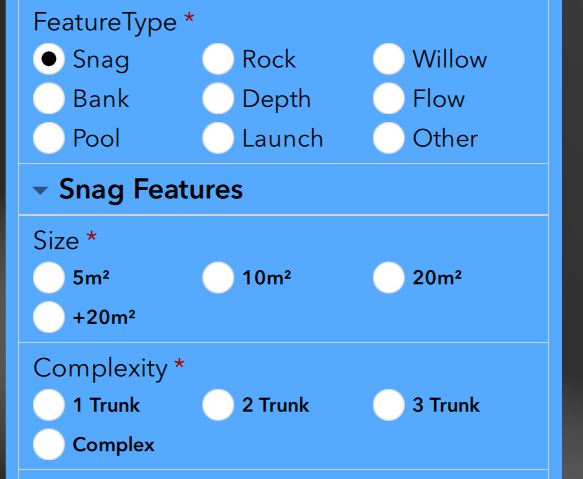
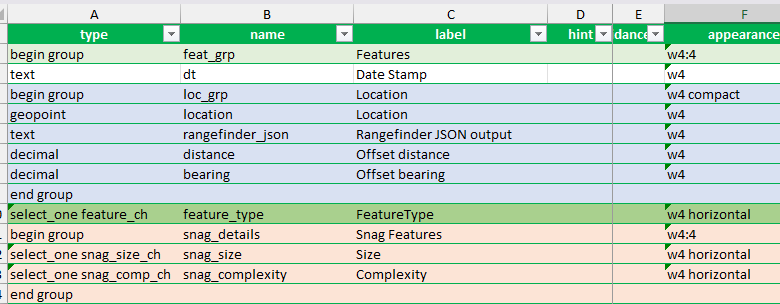
I'm creating a Survey though Survey123 Connect (v3.25.27) and have an issue where horizontal radio buttons seem to ignore the column count setting (survey style set to dynamic-grid). I have two select questions each with 4 choices. I want these choices to be displayed horizontally. In the screen shot you can see they always seem to be displayed in 3 columns regardless of reducing font size. I set an all encompassing group to w4:4 and then the actual selection groups to w4. Any thoughts on how to make the radio buttons display in a rows of 4?
Try using compact-4 or horizontal-compact-4, that should force to 4 columns
Appearance—ArcGIS Survey123 | Documentation
Generally, follow Neal's advice for changing the number of choice columns for a question. Just be aware that if you force too many columns for choices (using compact, horizontal, horizontal-compact), it may stack the text for an answer, or it may not add any additional choice columns, it depends on the space the question has available to it.
While Grid columns (e.g. the w4 numbers) are separate from the choice column widths (e.g. compact-4) the Grid width of your question can limit the number of choice columns the survey will allow, depending on the length of the choice texts. It is entirely possible you may be limited to 3 choice columns for the FeatureType question because of the length of the text and the grid space available to it. You're going to have to play around with combinations, but be prepared to accept you won't be able to get the 4 choice columns.
Here's some screenshots using page 2 of the grids template. You can see I tried to make precipitation a compact-4 and it won't add more than 1 column of choices with the amount of space the question has allotted as a w1 grid column, but when I made the question a span 2 columns (w2 instead of w1) I could use the compact-4 and get 4 columns for the choices.
The 3rd screenshot I tried to make Wind Direction a compact-5 and the precipitation a compact-4 with maintaing the grid space allotted to w1 for each. You'll see it allowed 2 choice columns for the wind, but still only 1 for the precipitation. That is because of the space available for the choice text, the wind choices aren't as long as the precipitation choice text so it allowed 2 choice columns, but they were still too long to allow 5 choice columns in the space available to Wind Direction.
The last 2 screenshots you will notice that even though wind direction is still a w1 column, it is behaving like a w2 column even though it is a w1. That is because the group grid is w2, and precipitation is set as a w2 after the wind direction, which is w1. Since 1 + 2 = 3, it forces the precipitation question to a new row and allows the wind direction to span both grid columns in the group. Now you will see that wind direction choices can be 5 columns wide using the compact-5, but we get the weird stacking text. Precipitation is still limited to 4 choice columns because of the choice text length, even though it is also set to compact-5.
Thanks TylerGraham2 for such a detailed explanation. That was really helpful and has given me the info I need to play around and get what I need. Thanks again!
Les membres connectés peuvent publier, suivre les mises à jour, et plus encore. Nouveau ici ? Inscrivez-vous gratuitement.
Find useful guides, FAQs, and documents to help you navigate and make the most of Esri Community.