Hi @RobertKrisher Some time has passed, and I was able to solve the issue with a different approach. I developed a script that automatically places a barrier whenever the trace reaches a Subnetwork Controller point. This script now works exactly as I wanted within the ArcGIS Pro interface.
import arcpy
import re

# ------------------------------------------------------------
# URL
# ------------------------------------------------------------
utility_network = "https://---/server/rest/services/Trace/FeatureServer/8"

# Starting Points  - FeatureServer/0
starting_points = "https://---/server/rest/services/Start_Points/FeatureServer/0"

# Barriers  - FeatureServer/1
barriers = "https://---/server/rest/services/Start_Points/FeatureServer/1"

# Electric Device (Subnetwork Controller) - FeatureServer/0
controller_fc = "https://---/server/rest/services/Trace/FeatureServer/0"

# ------------------------------------------------------------
# CLEAR BARRIER
# ------------------------------------------------------------
print("Clear Barrier")

with arcpy.da.UpdateCursor(barriers, ["OBJECTID"]) as cur:
    for row in cur:
        cur.deleteRow()

print("Barrier Cleared")

# ------------------------------------------------------------
# GET STARTING POINT GUID
# ------------------------------------------------------------
start_guid = None
with arcpy.da.SearchCursor(starting_points, ["FEATUREGLOBALID"]) as cur:
    for row in cur:
        start_guid = row[0]
        break

if not start_guid:
    raise Exception("No starting point found.")

print("Starting GUID :", start_guid)

# ------------------------------------------------------------
# TRACE
# ------------------------------------------------------------
def run_trace():
    arcpy.un.Trace(
        in_utility_network=utility_network,
        starting_points=starting_points,
        barriers=barriers,
        trace_config_name="{31407091-970B-4B14-BF68-F8C25B1349D6}",
        related_record_fields=None,
        result_fields=None
    )

# ------------------------------------------------------------
# GUID -> OBJECTID
# ------------------------------------------------------------
def get_objectid_from_guid(guid_value):
    guid_clean = guid_value.replace("{", "").replace("}", "")
    where = f"GLOBALID = '{{{guid_clean}}}'"

    with arcpy.da.SearchCursor(controller_fc, ["OBJECTID"], where) as cur:
        for row in cur:
            return row[0]
    return None

# ------------------------------------------------------------
# BARRIER INSERT
# ------------------------------------------------------------
def insert_barrier(target_guid):
    oid = get_objectid_from_guid(target_guid)

    if oid is None:
        raise Exception("OBJECTID bulunamadi.")

    fields = [
        "FEATUREOID",
        "FEATUREGLOBALID",
        "LAYERID",
        "SOURCEID",
        "ASSETGROUPCODE",
        "ASSETTYPE",
        "TERMINALID",
        "PERCENTALONG",
        "ISFILTERBARRIER"
    ]

    values = [
        oid,
        target_guid,
        200,
        9,
        85,
        363,
        4,
        -1,
        0
    ]

    with arcpy.da.InsertCursor(barriers, fields) as icur:
        icur.insertRow(values)

    print("Barrier added", target_guid)

# ------------------------------------------------------------
#
# ------------------------------------------------------------
try:
    print("The first trace is being tested...")
    run_trace()
    print("Trace successful.")

except arcpy.ExecuteError:
    msg = arcpy.GetMessages(2)
    print(msg)

    if "multiple subnetwork controllers" in msg.lower():
        guids = re.findall(r'\{[0-9A-Fa-f\-]{36}\}', msg)

        if len(guids) < 2:
            raise Exception("GUID not found.")

        start_guid_clean = "{" + str(start_guid).replace("{", "").replace("}", "") + "}"

        other_guid = None
        for g in guids:
            if g.upper() != start_guid_clean.upper():
                other_guid = g
                break

        if not other_guid:
            raise Exception(" controller GUID not found.")

        print("Barrier adding:", other_guid)
        insert_barrier(other_guid)

        print("Trace is working again...")
        run_trace()
        print("Trace successful")

    else:
        raise Exception("Unexpected Trace error: " + str(msg))

print("\n=== TRANSACTION COMPLETE ===")I would like to ask for guidance about a Utility Network trace automation workflow.
- A user places a starting point on the map.
- The script runs a Trace operation.
- If the trace returns the following error:
ERROR 001890: Invalid subnetwork connectivity, multiple subnetwork controllers with different subnetwork names found.
- The script reads the error message and extracts the two GlobalIDs listed in the message.
- It compares them with the starting point GlobalID.
- It automatically creates a barrier point on the other GlobalID (not the starting point).
- The same trace is executed again.
- On the second run, the trace completes successfully without error.
So overall, the script acts as an automatic workaround for controller conflicts and it runs correctly inside ArcGIS Pro.
My Problem
I now want to publish this script as a Geoprocessing Tool / Share as Web Tool so I can use it inside Experience Builder.
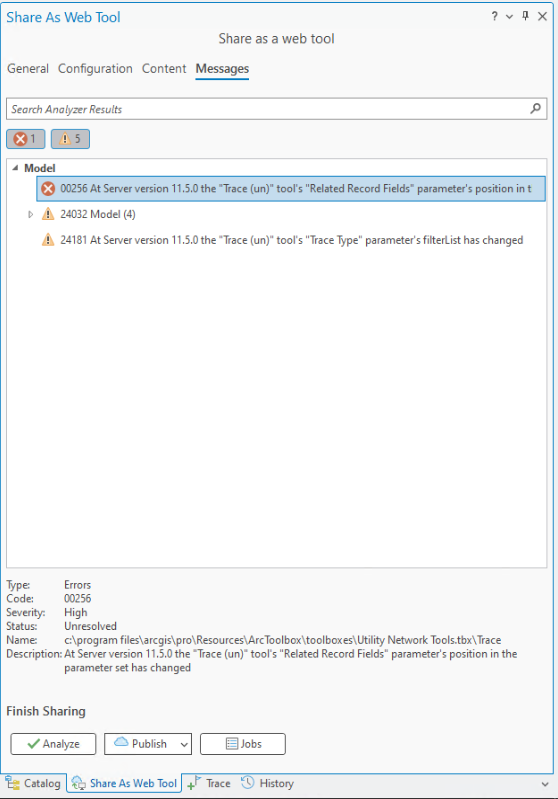
However, during publishing I receive this error:
at the server version 11.5 the related record fields parameters position in the parameter set has changed
According to Esri documentation, related_record_fields is not a required parameter. I still explicitly added that parameter in the script, but the publishing error remains.
My Goal
My final goal is to run this custom trace logic inside Experience Builder through a Geoprocessing widget.
My Questions
- Is publishing a Python script with arcpy.un.Trace() as a Web Tool the correct architecture for this scenario?
- Is there a better approach for Experience Builder (for example calling the Utility Network REST trace endpoint directly)?
- Has anyone seen this publishing error with ArcGIS Enterprise 11.5 and Utility Network trace tools?
Any guidance would be greatly appreciated.