Idea: indicate in the Contents pane when a symbol class has been unchecked in the symbology pane (or remove the class from the legend in the Contents pane while it is unchecked)
Reason: In ArcGIS Pro 3.6, it is possible to uncheck a symbol class in the symbology pane to hide it from the map without having to remove the class and lose its symbology (I'm not sure when this was added, but it's very useful and I like it!).
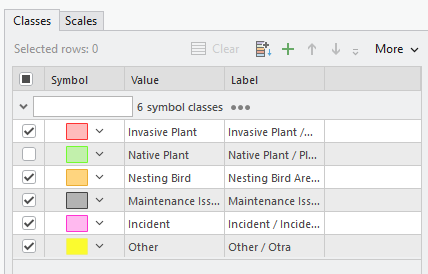
However, the unchecked class still appears in the Contents pane.
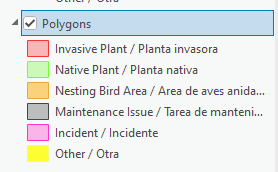
This can lead to confusion later on if the user forgets that the class is unchecked, or if another user opens the project and doesn't realize it has been unchecked. They might determine on visual inspection of an area of the map that the class has no features in the current map extent.
It would be very helpful if the unchecked class were hidden or grayed out in the Contents pane or otherwise flagged as hidden.
I know there are probably scenarios where someone might want to include all classes in a legend while simultaneously hiding features belonging to one or more classes, but that's what definition queries are for. 🙂




