I have a super frustrating issue with a hosted feature layer and at this point am assuming that this is a bug in the Map Viewer Editor. I have a Web Map with a map service created specifically for testing purposes that contains a polygon layer and a table with a relationship class. The CustID field in the polygon layer is the foreign key and is also the field that needs to be populated when a new feature is created. This should not automatically disable editing for the field. When I add a new feature to the polygon layer however, the CustID field in the Editor is disabled for editing, but I AM able to edit the field from the attribute table. This leads me to believe that the issue is with the form and not the layer settings.
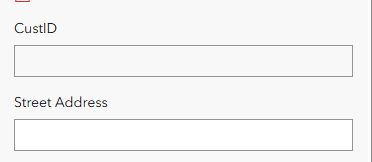
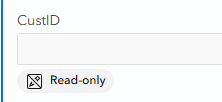
In the Form config for the layer, the field shows up as Read-only and Editing is apparently disabled in the field settings:
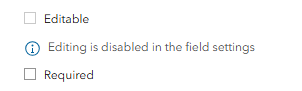
The problem is that I am unsure of what field settings this message is referring to. The field settings in the layer details seems to indicate that the field is editable:

Also, the field is not Read Only when published. The box is unchecked in the layer field properties:

One more thing of note is that the Details page for the layer does not have a Settings tab for some reason, which would be the only other way I know of to alter the edit settings for the layer:
 <------------- No Settings Tab
At this point I could have saved a lot of time by just scrapping the map service and creating a new one, but I would like to understand what I am missing first, if anything.



