Hello. I am working on a project that inventories trees with name, genus, species, and family fields. We are not using the Esri tree management solution for now, but I did snitch the species roster.csv file from the solution for our use. My desire is to enter the common tree name, for example, Alaska-Cedar, and have the remaining fields autopopulated with the correct genus, species, and family values pertaining to the tree selected - at least that's how I think this should work.
I have created coded value domains for each field, assigned them to their respective field, created contingent_values and field_groups.csv files, and ran the Import Contingent Values GP tool successfully. I jump into the attribute table directly and click in common name and select the common name for the tree I want to add to the inventory. I was expecting to see the remaining fields populate with the corresponding values automatically. I end up clicking on each field, searching each list for the correct values (using the original roster.csv as reference), and selecting the values. When I get to Family there is one correct choice visible. If I stop anywhere along the way, this error pops-up. I also see the same error when I try to the Create Features tool and select the feature class.
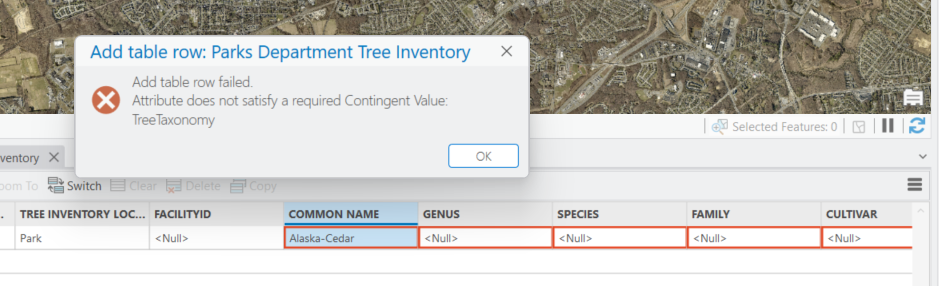
I cannot figure out what is amiss. Our arborist noted species populates based on common name, genus based on species, and family based on genus.
Field_Groups.csv

Contingent_Values.csv - value1 is common name, value2 is species, value3 is genus, value4 is family.

Cultivar is present but our arborist has not requested this field.
We plan to use Field Maps forms to collect the data, assuming we can get this taxonomy workflow working.
Any help would be greatly appreciated, thanks in advance. Regards, Jay




