The below is the ArcMap UI for setting impedance in a service area layer:
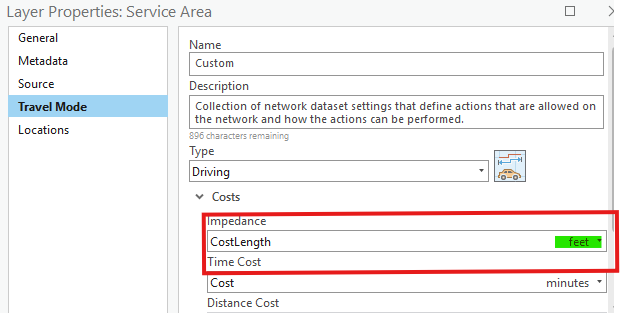
Is there a way to set this in model builder?
Our county's central GIS office set up our network dataset and I can't change it. It includes attributes (fields) such as FT_COST, FT_SPEED, FT_MINUTES. FT_COST and FT_MINUTES are the same for most street segment - they both represent time costs. I need service areas based on distance (feet or miles), but model builder seems to keep defaulting FT_COST or FT_MINUTES. If I change the impedance in Pro to "CostLength feet" in the above screenshot, I get the expected results. One way streets and overpasses (F_ZLEV, T_ZLEV) are respected as well.
But I want to use model builder so we don't have to go through all of these steps manually. But I can't find a place to set the impedance to distance/length. Is this possible in model builder?
I also tried exporting the model to python and then adding a travel mode:
    #new_travel_mode = arcpy.na.TravelMode(travel_modes["Driving Distance"])
    new_travel_mode = arcpy.na.TravelMode()
    new_travel_mode.impedance = "Feet"

    # Process: Make Service Area Analysis Layer (Make Service Area Analysis Layer) (na)
Service_Area2 = arcpy.na.MakeServiceAreaAnalysisLayer(network_data_source=TRANSROUTING_ND, layer_name="Service Area2", travel_mode=new_travel_mode, travel_direction="FROM_FACILITIES", cutoffs=[2], time_of_day="", time_zone="LOCAL_TIME_AT_LOCATIONS", output_type="LINES", polygon_detail="STANDARD", geometry_at_overlaps="OVERLAP", geometry_at_cutoffs="RINGS", polygon_trim_distance="100 Meters", exclude_sources_from_polygon_generation=[], accumulate_attributes=["CostLength"], ignore_invalid_locations="HALT")[0]But line 6 bugs out with this error: ERROR 030232: Invalid travel mode value: "The travel mode refers to an impedance attribute that does not exist.''
I am using Pro version 3.0.3. We can't upgrade due to incompatibilities with our county's ArcGIS Server Version.
Thanks for any insight that you can provide!

