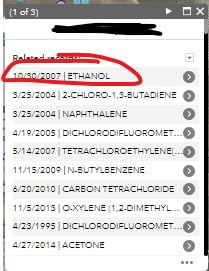
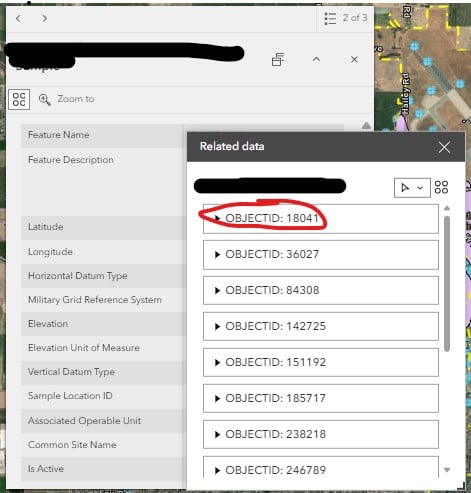
I am trying to configure the pop-up for my related data in Experience Builder to display custom fields vs defaulting to Object ID. We were previously using Web Applications and were able to get the related data pop-up to display how we wanted by configuring the pop-up in the web map. It doesn't seem to be working the same way in Experience builder. Below I've included a pic of what the pop-up looks like in the Web App vs Experience builder. We'd like to get the Experience Builder Pop-up to look like the Web App. Is there a different area to configure this information for Experience Builder beside the pop-up configuration in the web map? Any guidance is appreciated!
You can configure your related table display through the popups
I've tried that and it's not working. My configuration in the Web Map vs what is showing on my app is below. Again...it shows up correctly in the old web mapping application, so not sure what the disconnect is with EB. I can't find where it's getting these titles from.
Going off of AGOL
It looks like you are adding a title under the fields list popup section rather than a title to the whole thing.
Not sure if this will fix or not but give it a try
Another map I checked with (this one Enterprise):
When I go into the layer and click related records. I can sort by and chose date and you can see here they are sorted by date.
Going to the related table popup you an see how I set the overall title. So in the popup it displays both the title and the date as expected above.
Make sure you add the related popup to the OG layer and configure popups on the table. Within EXB I then set it to automatically expand the result of a query to see the popup.
No dice....this is really frustrating, but I'll keep trying different things I guess. I really appreciate your help and taking the time to try and help me figure this out!
I had high hopes for that last solution of overwriting the display name, but that didn't work either. It's so weird. It shows up fine in the old web mapping application when I configure the pop-up for the related data table, but not in Experience Builder.
I have the same issue, a related table in the portal instance is not respecting the title configuration and just defaults to ObjectID. in the old WAB i was able to configure hyperlinks at the title level too, but not the case here either.
Has anybody found a solution for this or gotten any reply from ESRI? I am having the same issue. Can't seem to change it no matter what I do.
Hi @JamalWest253 . I have not received a solution that works yet. I played around with it a lot and could never figure out a solution.
Has anyone had any luck with the related table pop up Title not working in Experience Builder. I am also having this issue with only OBJECTID in the related table records. I tried changing pop up settings in the map to no luck. Would love to hear of anyone's work around.
Joanne
Hi Joanne,
No...I have not seen a solution to this yet, nor have found a work around. The few suggestions given did not work for me.
Jalayne
I have the same problemI have tried all possible solutions and workarounds: services, webmaps, etc; but there is no solution Thanks!
version 1.18 was released today, let's hope that some progress can be made... we'll have to try it out.
I think it has something to do with setting up the Feature Info widget although i haven't tried that yet. I'm having the same issue. Here is some documentation. https://doc.arcgis.com/en/experience-builder/latest/configure-widgets/feature-info-widget.htm. In some references I've read, i'm also wondering if it has something to do with whether the map was published from ArcGIS Pro.
I have the same issue. I hope it is fixed soon. Thanks for posting.
Either this was fixed or I just figured out how to resolve the issue. Instead of trying to configure the pop-up under the layer that has the related table information, I configured the pop-up for the actual table itself, and now it displays as I want it to. First I added "Related Records" to the layer pop-up. This will make it so the related records show up at the bottom of the layer pop-up window (vs using the "action" button to view related records). Then you can go to the properties for the table the related records are stored in, and configure that pop-up however you like. I've included some screenshots below that hopefully help:
This is the pop-up that I configured from the table that displays when I select the records at the bottom of the layer window:
Hope this helps some people! Let me know if you have any additional questions!
I think they may have done an update, or I finally figured out a workaround...see my last post below.
Les membres connectés peuvent publier, suivre les mises à jour, et plus encore. Nouveau ici ? Inscrivez-vous gratuitement.
Find useful guides, FAQs, and documents to help you navigate and make the most of Esri Community.