In my xbuilder app I have created a window with a view navigation widget and the section widget with multiple views. The window opens after a user clicks a button in a splash window.
My issue was the view navigation widget that didn't behave as expected within a window. Every time I would click one of the view navigation widget text headers the window closes instead of changing to the appropriate section view within the window. It doesn't seem to matter if a window is set to be the splash screen or not.
After troubleshooting, I noticed the URL parameters change after clicking the header and the window closes:
https://experience.arcgis.com/experience/item id/page/Map?dlg=Guided-Tour&views=Introduction
becomes
https://experience.arcgis.com/experience/item id/page/Map?views=Legend
instead of
https://experience.arcgis.com/experience/item id/page/Map?dlg=Guided-Tour&views=Legend
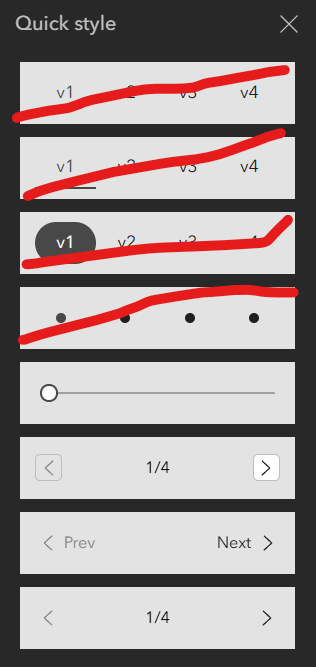
After some more troubleshooting, I realized that this only happens when you pick certain quick styles for the view navigation widget. Specifically, the text header ones and the dot ones. It looks like certain quick styles don't pass the dlg= parameter (that I assume specifies the window) for some reason.
This issue isn't a problem when you use the arrow quick styles in the view navigator widget. I crossed out the ones I had issues with in the image below: