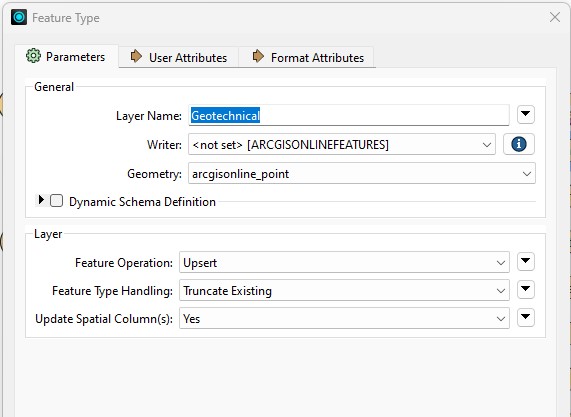
In FME Workbench 2023.1, I'm using the ESRI ArcGIS Online Feature Service Writer to update a layer in AGOL with data from a local fGDB. I have the writer configured as per the screenshot below.
After it runs, the layer in AGOL is visible when zoomed all the way out! (This was not previously the case).
So, then I republish the layer in ArcGIS Pro and it fixes the layer so that it now disappears when zoomed out (I could also do this directly in AGOL).
I then change the FME writer to ‘Use Existing’ (and not ‘Truncate Existing’) and re-run the translation.
This time it works without affecting the AGOL layer visibility.
So I change the FME writer back to ‘Truncate Existing’ (and not ‘Use Existing’) and re-run the translation.
It breaks the AGOL layer visibility again!
I plan to use something like this to update many layers, and I cannot have them all visible when zoomed out. It would be a complete mess.
Am I doing something wrong? How can I update the data (including deleting features) without affecting the AGOL layer’s visibility?
(The issue occurs for both 'Insert' and 'Upsert'. I’m using ‘Truncate Existing’ so that if we delete a feature locally, this will cause it to be deleted on AGOL. Perhaps there is a better way to do this? But that would be another question entirely.)