I'd like to incorporate this manual workflow into my dockpane, but I don't find any useful documentation or samples. Does anyone know if it is possible and if yes, how it can be done?
my manual workflow:
I open an enterprise geodatabase feature class in a map in ArcGIS Pro. Then I open layer properties and go to source. there is the field "Query" (not definition query!) containing something like this "select attribute 1, attribute 2, ..., attribute n FROM layername".
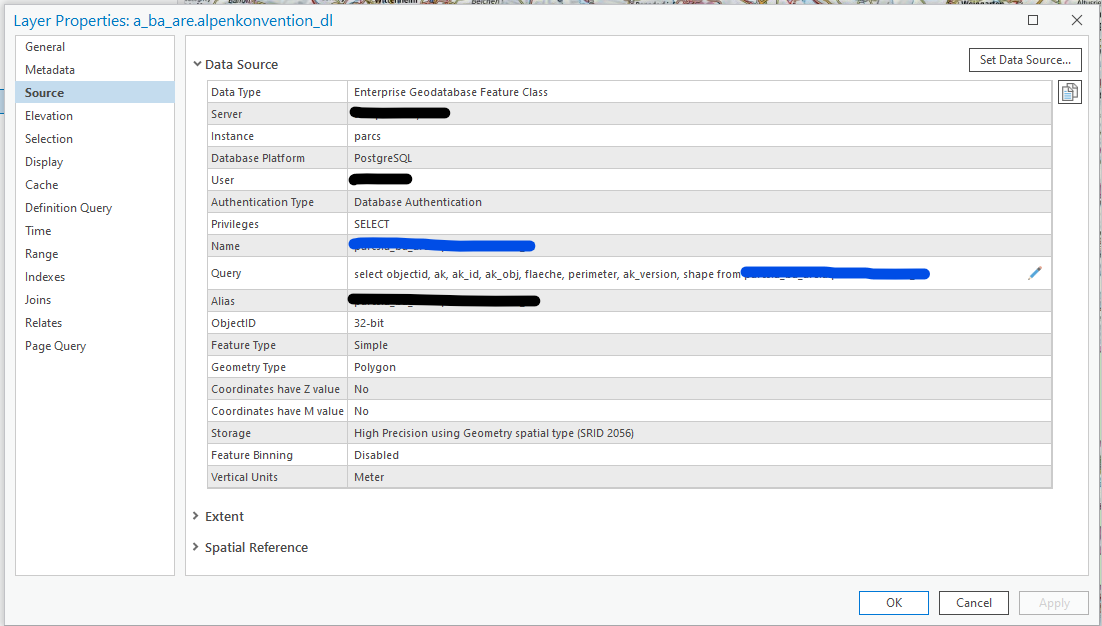
I then click on the pen on the right hand side and modify the query to "select * from layername".
I found this documentation: https://pro.arcgis.com/en/pro-app/latest/help/mapping/layer-properties/define-parameters-in-a-query-layer.htm
but I'm trying to do it in a dockpane for any layer that i add to my map using this method:
using (Geodatabase geodatabase = new Geodatabase(new DatabaseConnectionFile(new Uri(sde_path))))
{

    //ArcGIS.Desktop.Framework.Dialogs.MessageBox.Show(featureClassDefinition.ToString(), "featureClassDefinition");
    using (FeatureClass fc = geodatabase.OpenDataset<FeatureClass>("parcs." + name))
    {
        // Create the feature layer creation parameters
        FeatureLayerCreationParams layerCreationParams = new FeatureLayerCreationParams(fc)
        {
            // Optionally set additional properties
            Name = name
        };


        // Create the feature layer and add it to the active map
        await QueuedTask.Run(() => LayerFactory.Instance.CreateLayer<FeatureLayer>(layerCreationParams, MapView.Active.Map));
    }
}
how can i add the layer such that its query says "select * from layername"? any help is greatly appreciated.



