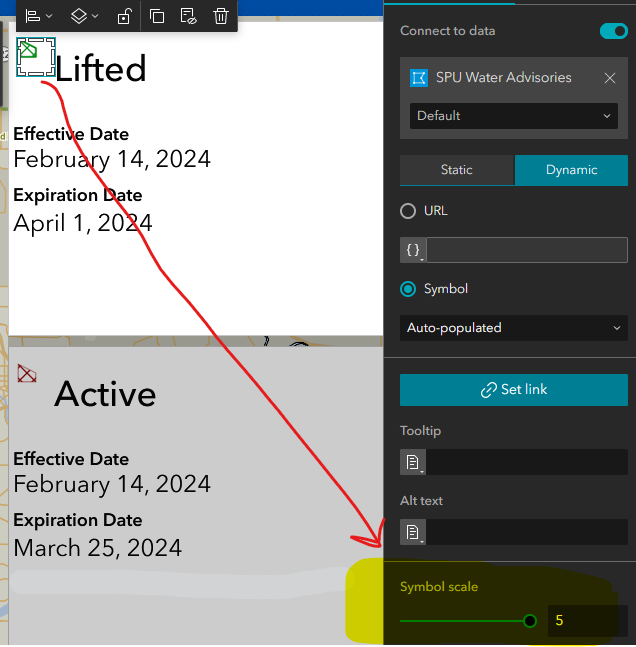
I am using a List component to display details about features in a layer in a web map. I am showing the legend symbol using an Image component by connecting it to data and having it dynamically auto-populated. That part works great but I'd like to make the symbol bigger. There is a "Symbol scale" property with a slider but it doesn't appear to change the size of the symbol image. Am I missing anything about what the Symbol scale property does or how to use it?
Thanks for any input
Thanks for this input @TonghuiMing Yes, I'm using a "Vector polygon" to show a hatch fill. And I can confirm your theory, switching it to a Basic shape solved that issue; the symbol does scale in the ExB app. I would prefer to use the hatch fill however as it works very well in this application. Can you keep us posted on a potential fix for this?
Hello @DavidPuckett
Per my testing, the behavior seems to be affected by the choice of the symbol.
See if I use unique symbols based on a field value (left) vs. using a vector symbol (right), and both symbol scales set to level 5:
Based on your screenshot, I assume you have the same case as the second
This could be a potential bug. We will take a further look at it, and it would be helpful if you could share the web map with us, if possible.
Thanks for bringing this up,
Tonghui
Les membres connectés peuvent publier, suivre les mises à jour, et plus encore. Nouveau ici ? Inscrivez-vous gratuitement.
Find useful guides, FAQs, and documents to help you navigate and make the most of Esri Community.