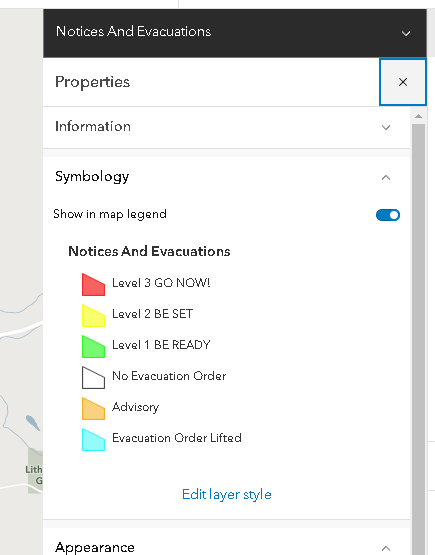
J’essaie de comprendre pourquoi la symbologie de ma couche ne change pas lorsque je la modifie dans la visionneuse de cartes AGOL. Cette couche a été créée par la Solution de gestion des opérations d’urgence . Je devais personnaliser les couches Avis et Évacuations pour mon organisation. Je veux que la symbologie corresponde à mes choix personnalisés et les affiche.Voici la symbologie de la couche
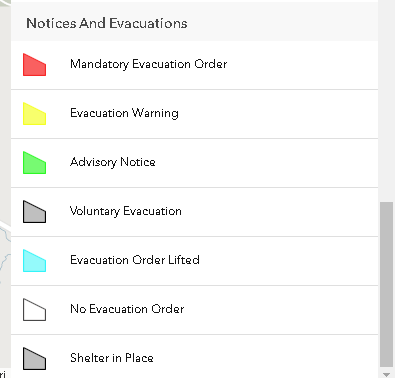
Voici la symbologie lors de la modification.
Hi @RickeyFight,
To update the choices in the Editor, you'll need to manage the feature templates. Support for managing feature templates within Map Viewer is on our future road map.In the mean time, you can use either Map Viewer Classic or the Field Maps Designer app.
To manage feature templates in the Field Maps Designer app, follow these steps:
Hope that helps!
@EmilyGeo Thank you for the help! I have not used Field Maps Designer.I am running into an issue on step 4. I do not see an 'Add Template' button.
I was able to change the template by using map viewer classic.
@EmilyGeo I their a webpage where we can track the current status of this new feature? Like Rickey, I have no option in Field Maps Designer to edit the existing template, or to create a new one.
Hi @BRENNEJM,
You should be able to manage templates for all layers that you own or administer. At this time, Templates can be managed in either Field maps or Map Viewer Classic.
To create a new template in Field Maps Designer, select an existing template and click the 'Duplicate' button, then update the attributes accordingly.
Les membres connectés peuvent publier, suivre les mises à jour et bien plus encore. Vous êtes nouveau ici ? Créez un compte gratuit.
Find useful guides, FAQs, and documents to help you navigate and make the most of Esri Community.