Mind you we are using an older version of Pro (2.9.3 currently) so I am not sure if this has been improved upon, but I doubt it since I could not find any other mention of this in the Community.
With ArcCatalog you can browse to a folder and create and new database connection there. With ArcGIS Pro that is not an option. I can create File Geodatabases or Mobile Geodatabases, but there is not a new Database Connection option like there is in good old ArcCatalog. Instead I have to create a connection in my Project then copy it to this location I want. That is more steps and I don't know why this was never implemented in ArcGIS Pro but I think this is a justifiable ask to add this to the context menu as shown in the attached screenshots. This would make working with the software much more user friendly in my opinion.
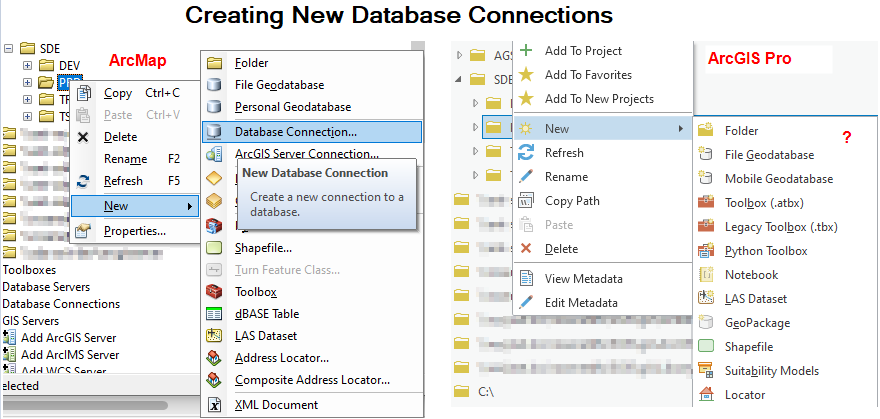
If there is a reason why Esri chose not to add this functionality to the context menu I would like to hear what that is. Otherwise why not implement this handy option?
Thanks for reading and considering this!


