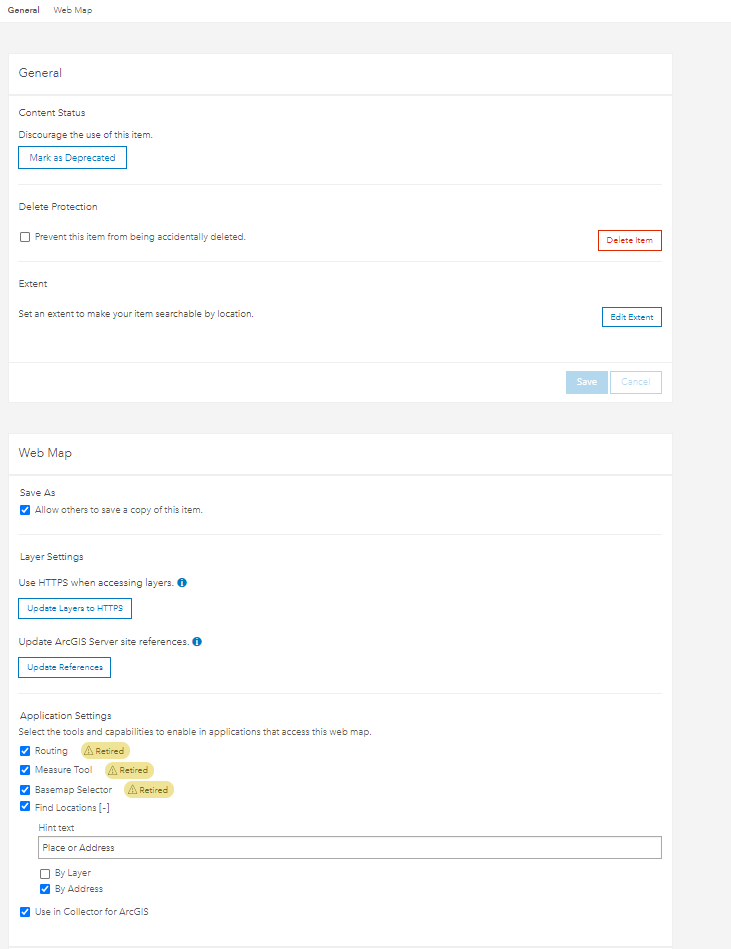
I has publish service on Arcgis Enterpriser 10.7.1 and enable "Query" and "Sync" in capabilities (guide: Prepare data for offline use—ArcGIS Server | Documentation for ArcGIS Enterprise)
But I not see button "enable offline mode"
And also not see button "download map" in collector apps mobile
I using system ArcGIS Enterprise 10.7.1.
I has try on ArcGIS Online is successful.
The issue can be about the basemap you use. If you are using Esri basemap at ArcGIS Enterprise, you need to add them as proxied basemap to support offline. You can see https://doc.arcgis.com/en/collector/ipad/help/offline-prep.htm , section "Use an Esri basemap on ArcGIS Enterprise" for more details
Thanks Miaogeng Zhang so much, i had can download maps on my device mobile. and now, i would like to create Maps Areas but error:
Log info:
Kindly help me.
For iOS Collector, you can turn on troubleshooting log at settings and get more info. You can also check Enterprise log to see if there is additional info there
Dear Miaogeng Zhang,
Thanks you for your support,
I has created Maps using offline, but i can't download maps offline on mobile device
error image:
Les membres connectés peuvent publier, suivre les mises à jour, et plus encore. Nouveau ici ? Inscrivez-vous gratuitement.
Find useful guides, FAQs, and documents to help you navigate and make the most of Esri Community.