Hi,
I'm trying to show related records in a pop-up. According to this blog ( https://www.esri.com/arcgis-blog/products/arcgis-online/mapping/rolling-out-related-records-in-map-viewer/ ) article, I should be able to do this, but for some reason I do not have the option to "Add Content - Related Records". See screenshot below. Can anyone explain what might be going wrong here??
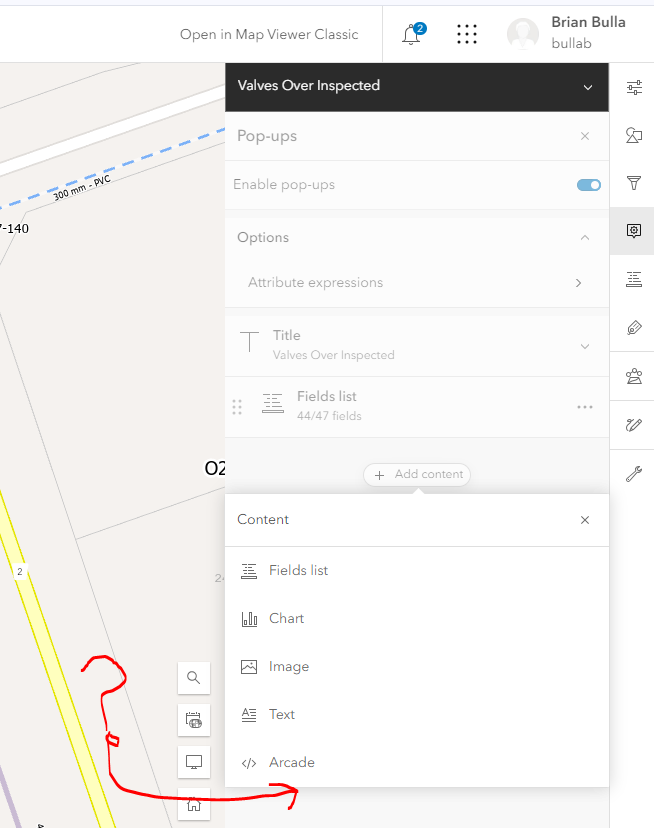
Here are the details on the webservice I am using. I can view the features, and modify the features fields in the pop-up. Just no access to the related table for some reason.
Works/Valves_Over_Inspections (MapServer)
View In: ArcGIS JavaScript ArcGIS Online Map Viewer ArcGIS Earth ArcMap ArcGIS ProView Footprint In: ArcGIS Online Map ViewerService Description:Map Name: Valves Over Inspections
LegendAll Layers and TablesDynamic LegendDynamic All LayersLayers:Tables:Description:Copyright Text:Spatial Reference: 26917 (26917)
Single Fused Map Cache: false
Initial Extent:Spatial Reference: 26917 (26917)
Full Extent:Spatial Reference: 26917 (26917)
Units: esriMeters
Supported Image Format Types: PNG32,PNG24,PNG,JPG,DIB,TIFF,EMF,PS,PDF,GIF,SVG,SVGZ,BMP
Document Info:TextAntialiasingMode: Force
Supports Dynamic Layers: true
MaxRecordCount: 2000
MaxImageHeight: 4096
MaxImageWidth: 4096
Supported Query Formats: JSON, geoJSON, PBF
Supports Query Data Elements: true
Min Scale: 0
Max Scale: 0
Supports Datum Transformation: true
Child Resources:
Info Dynamic LayerSupported Operations:
Export Map Identify QueryDomains QueryLegends Find Return Updates





