I'm having an issue making an image and text float side by side. Using the Arcade content block and associated html I get this result:
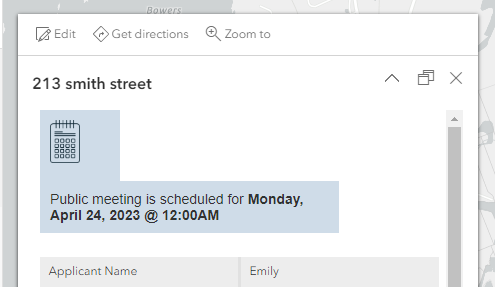
var public_date = Text($feature.meeting_date,'dddd, MMMM D, Y @ hh:mmA')

return {
    type: 'text',
    text: `
        <div style="float:left;padding:10px;background-color:#cfdce8;width:20%;"><img style="float:left;width:30px;" src="{image_url}"></div>
        <div style="font-family:arial;float:right;align-top;padding:10px;width:75%;background-color:#cfdce8;">Public meeting is scheduled for <strong>${public_date}</strong></div>
        `
I have also tried using the Text (Source Formatting) content block and still couldn't get the image and text to float side-by-side.
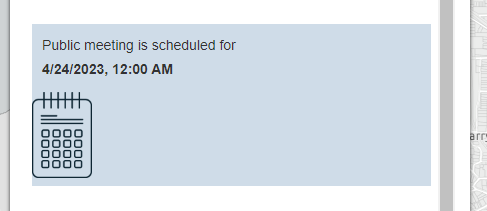
<div style="background-color:#cfdce8;">
    <div style="float:left;padding:10px;width:65%;">
        <span style="font-family:arial;">Public meeting is scheduled for <strong>
        {meeting_date}</strong></span>
    </div>
    <div style="float:right;width:15%;">
        <img style="float:right;" src="https://wpsgn.maps.arcgis.com/sharing/rest/content/items/7571b914c3fc40929328a5be04331759/data">
    </div>
</div>
any help is appreciated,


