ArcGIS Pro 3.0.3; mobile geodatabase.
I have a definition query on a standalone table:
OBJECTID IN (3, 5, 11)
In a FC, I create a join to the table with the definition query (join: ASSET_ID=ASSET_ID). The definition query gets applied to the joined FC, and the OBJECTID gets automatically prefixed with the table name:
main.RoadInspTable.OBJECTID IN (3, 5, 11)
That works as expected.
Next, I do the same thing, but this time using a more complex definition query, one that has a subquery:
objectid IN (
     SELECT objectid
       FROM roadinsptable r2
      WHERE r2.asset_id = roadinsptable.asset_id
   ORDER BY date_ DESC, condition DESC
      LIMIT 1
)Use case for the complex definition query: https://community.esri.com/t5/arcgis-pro-ideas/one-to-first-joins-control-what-related-record-is/idc-p/1239993/highlight/true#M22488
When I go to create the join, I use the Validate Join tool first. The join is valid.
But when I create the join, it fails:
Failed to refresh table.
Error:
Underlying DBMS error [ambiguous column name:
objectid] [Roads][STATE_ID = 0]
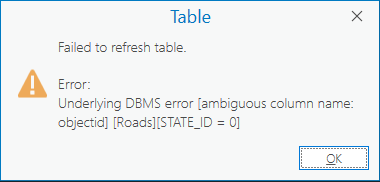
The problem is: ArcGIS Pro hasn't given OBJECTID a prefix in the joined FC's definition query.
How it is:
objectid IN (
     SELECT objectid
       FROM roadinsptable r2
      WHERE r2.asset_id = roadinsptable.asset_id
   ORDER BY date_ DESC, condition DESC
      LIMIT 1
)How it should be:
roadinsptable.objectid IN (
     SELECT objectid
       FROM roadinsptable r2
      WHERE r2.asset_id = roadinsptable.asset_id
   ORDER BY date_ DESC, condition DESC
      LIMIT 1
)If I manually add the prefix to the joined FC's definition query, then it works as expected. The error goes away.
But it took some time to figure out why that was happening.
Since prefixes already get added to columns in simple definition queries, could the same thing happen for more complex definition queries? (ones with subqueries like above)
That would avoid some headache.
Thanks.



