Hello,
I'm trying to convert from using Attribute Assistant to Attribute Rules and I'm struggling with one of my old rules built with the INTERSECTING_FEATURE method. Here's the problem:
I'm mapping parking blocks and I need to pick up the street name of the longest intersecting street segment (S 19th St in the simple illustration below)
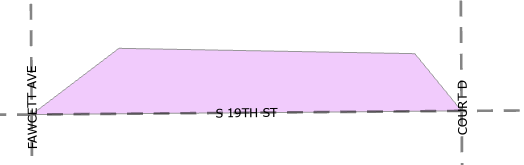
The ArcMap/AA method worked beautifully and seemed to pick up the longest edge most of the time. However with the new Attribute Rule that I set up (using Pro 3.0), it seems to pick up the other streets that it intersects with, even if it's just one vertex (COURT D or FAWCETT AVE above). When I loop through all the features it seems random, so I can't use the FIRST function.
I think I'm still not understanding the fundamentals about how the Intersects function works. Does anyone have any suggestions on how to filter out the street segment with the longest intersecting edge?
Thank for you thoughts and suggestions!
Here's my code:
//Cycle through all intersecting streets and return street name
var streetLayer = FeatureSetByName($datastore,"baseStreetCenterline", ["ST_NAME"]);
var searchDistance = 0;
var streetIntersect = Intersects(streetLayer, $feature);
var cnt = Count(streetIntersect);
var name = Null
if (cnt > 0) {
for (var street in streetIntersect) {
name = street.ST_NAME;
}
}
else {
// pass no features found within search distance, name remains null
}
return name;


