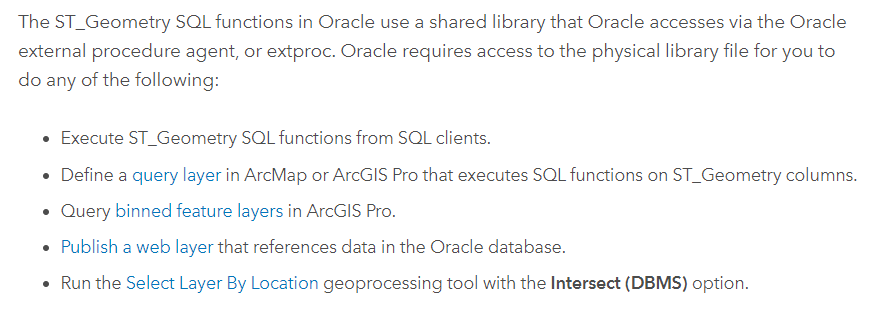
The ArcGIS Pro manual (see https://pro.arcgis.com/en/pro-app/2.9/help/data/geodatabases/manage-oracle/configure-oracle-extproc.htm) says :
But even if st_shapelib and extproc are not configured at all, the ArcGIS Server services create extproc processes on the database server. How is this to be explained ...
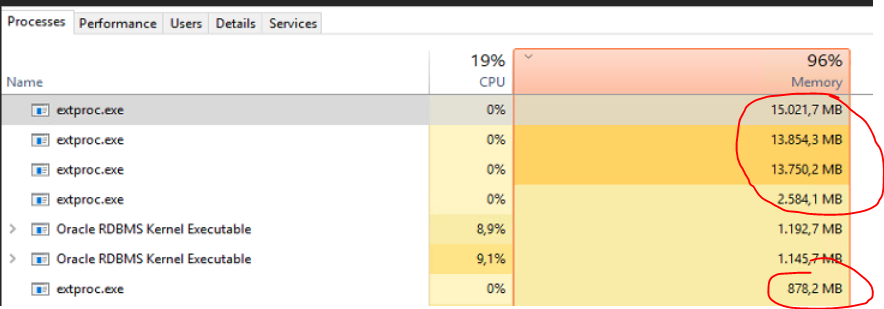
... and why do they grow so rapidly during operation. In our customer’s environment ArcGIS Server produces extproc processes of exorbitant size which finally crash the database server:
Any idea (helping to understand) would be great!
@George_Thompson ?
Regards,Martin
I have not seen that happen before. I would recommend contacting Esri tech support to work on this.Sounds a little weird.
... and for these points it is possible that the extproc processes grow rapidly to a lot of gigabytes?
And the st_shapelib is not configured for extproc.ora in the EGDB!
My guess is that one or more of their feature services / web maps are performing 2 or 4. If you have a staging environment you should be able isolate the issue to a specific service or map that is behaving badly. If you are unable to reproduce using just the feature services, then one or more of your users may be performing items 1, 3, and/or 5.
I have not seen that before. Are there any other Enterprise Geodatabases on that Oracle server?
How are you determining that the ArcGIS Server service is utilizing the Oracle extproc process?
Can you provide information about your workflow and what your customer is doing? Which of the operation(s) listed in the help are they performing when you are experiencing this behavior?
Les membres connectés peuvent publier, suivre les mises à jour, et plus encore. Nouveau ici ? Inscrivez-vous gratuitement.
Find useful guides, FAQs, and documents to help you navigate and make the most of Esri Community.