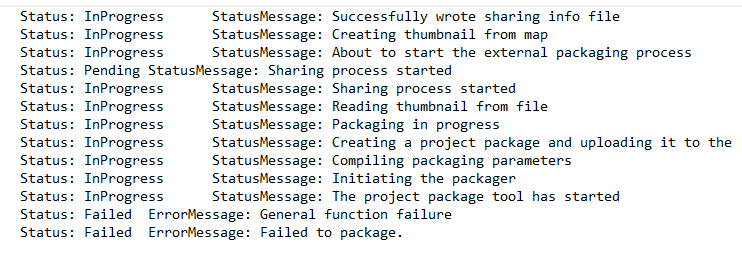
Hello,
I have been trying to package a very simple project and keep on getting errors at the very end saying "Status: Failed ErrorMessage: General function failure" and "Status: Failed ErrorMessage: Failed to package." When I run the analysis tool there are no errors. I've tried restarting everything multiple times and I have no history items or toolboxes included. I'm not sure what I'm missing I've pasted an image of all the status messages.
Well, I guess that is one workaround. Another is making a map package. Hopefully this won't be an issue in the future!
Can you provide more details? What version of ArcGIS Pro? What does your project look like (what does it include in terms of layers)? Are all the appropriate fields filled in for the Package itself (like summary, tags, etc.)?
I'm using ArcGISPro 2.8.3. The project includes 6 feature class layers of polygons (see below-all layers have the same properties). I have projected everything and the map in the same coordinate system. I added a summary and tag, but I created them myself- both are labeled as"BasinOutlines."
The next thing I would check would be any special or unique characters. I have had more things break than I care to admit due to semi-colons, parentheses, ampersands, and even commas, etc. Plus, the software doesn't always tell you why there is an error when it is related to a special character.
Thanks! I tried creating a layer package instead of project package and that worked for some reason!
I had the same problem. For me the solution was that I needed to not have any joins or relates. So I exported my layers to new layers with the joins and it worked!
Les membres connectés peuvent publier, suivre les mises à jour, et plus encore. Nouveau ici ? Inscrivez-vous gratuitement.
Find useful guides, FAQs, and documents to help you navigate and make the most of Esri Community.