Xander Bakker I am running into a problem of the mathematical expression in raster calculation. Earlier we had worked for writing the below code. According to existing mathematical function in the script, if raster cell value will be
Earlier we had worked for writing the below code. According to existing mathematical function in the script, if the raster cell value (Mean raster in script ) will be increase or cross the threshold value (23 mentioned in script) , output raster cell should be decreased . But with this code, I am getting reverse output which is not desirable. I have checked the same mathematical equation in Arc GIS raster calculator and Excel also, both results are same. But Output generated from below script is not matching with Excel and Arc GIS raster calculator's result . Kindly provide your guidance to solve the issue .
Below I have attached the link for raster data, which I am working on. Due to size limit here, I just uploaded on dropbox.
I am using Arc GIS 10.3 and script running on PyScripter
In below equation Topt = 23 which is constant value (in our script) and T = Monthly mean raster data which is changed monthly.
Data link : Dropbox - TEST_TSCALAR1.rar
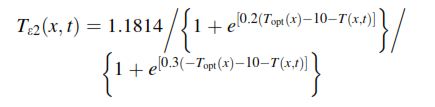
Script copied from Arc GIS raster result :
arcpy<SPAN class="punctuation token">.</SPAN>gp<SPAN class="punctuation token">.</SPAN>RasterCalculator_sa<SPAN class="punctuation token">(</SPAN><SPAN class="string token">"""(1.185 / (1 + Exp(0.2 * (23 - 10 - "Mean_Temp_010.tif"))) / (1 + Exp(0.3 * ( - 23 - 10 + "Mean_Temp_010.tif")))) * 0.99"""</SPAN><SPAN class="punctuation token">,</SPAN> <SPAN class="string token">"D:/NPP_GUJARAT/WEATHER_DATA/2012/T_SCALAR_2012C/T_SCALAR_010A.tif"</SPAN><SPAN class="punctuation token">)</SPAN><SPAN class="line-numbers-rows"><SPAN></SPAN></SPAN>
ArcPy Script,
<SPAN class="keyword token">import</SPAN> arcpy<SPAN class="punctuation token">,</SPAN> os<SPAN class="punctuation token">,</SPAN> calendar
<SPAN class="keyword token">from</SPAN> arcpy<SPAN class="punctuation token">.</SPAN>sa <SPAN class="keyword token">import</SPAN> <SPAN class="operator token">*</SPAN>
<SPAN class="keyword token">from</SPAN> arcpy <SPAN class="keyword token">import</SPAN> env
arcpy<SPAN class="punctuation token">.</SPAN>env<SPAN class="punctuation token">.</SPAN>overwriteOutput <SPAN class="operator token">=</SPAN> <SPAN class="token boolean">True</SPAN>
arcpy<SPAN class="punctuation token">.</SPAN>CheckOutExtension<SPAN class="punctuation token">(</SPAN><SPAN class="string token">"Spatial"</SPAN><SPAN class="punctuation token">)</SPAN>
topWorkspace <SPAN class="operator token">=</SPAN> r<SPAN class="string token">'D:\TEST_TSCALAR'</SPAN>
ws_out <SPAN class="operator token">=</SPAN> r<SPAN class="string token">'D:\TEST_TSCALAR\T_SCALAR_OUT'</SPAN> <SPAN class="comment token">### Output folder!!!</SPAN>
arcpy<SPAN class="punctuation token">.</SPAN>env<SPAN class="punctuation token">.</SPAN>workspace <SPAN class="operator token">=</SPAN> topWorkspace
<SPAN class="comment token"># Get dict of months and month-number (i.e. January = 001, March = 003 etc.)</SPAN>
months <SPAN class="operator token">=</SPAN> <SPAN class="punctuation token">{</SPAN>calendar<SPAN class="punctuation token">.</SPAN>month_name<SPAN class="punctuation token">[</SPAN>i<SPAN class="punctuation token">]</SPAN><SPAN class="punctuation token">.</SPAN>upper<SPAN class="punctuation token">(</SPAN><SPAN class="punctuation token">)</SPAN><SPAN class="punctuation token">:</SPAN> str<SPAN class="punctuation token">(</SPAN>i<SPAN class="punctuation token">)</SPAN><SPAN class="punctuation token">.</SPAN>zfill<SPAN class="punctuation token">(</SPAN><SPAN class="number token">3</SPAN><SPAN class="punctuation token">)</SPAN> <SPAN class="keyword token">for</SPAN> i <SPAN class="keyword token">in</SPAN> range<SPAN class="punctuation token">(</SPAN><SPAN class="number token">1</SPAN><SPAN class="punctuation token">,</SPAN> <SPAN class="number token">13</SPAN><SPAN class="punctuation token">)</SPAN><SPAN class="punctuation token">}</SPAN>
<SPAN class="comment token"># Step through list of all folders</SPAN>
<SPAN class="keyword token">for</SPAN> folderPath <SPAN class="keyword token">in</SPAN> arcpy<SPAN class="punctuation token">.</SPAN>ListWorkspaces<SPAN class="punctuation token">(</SPAN><SPAN class="punctuation token">)</SPAN><SPAN class="punctuation token">:</SPAN>
baseName <SPAN class="operator token">=</SPAN> os<SPAN class="punctuation token">.</SPAN>path<SPAN class="punctuation token">.</SPAN>basename<SPAN class="punctuation token">(</SPAN>folderPath<SPAN class="punctuation token">)</SPAN><SPAN class="punctuation token">.</SPAN>upper<SPAN class="punctuation token">(</SPAN><SPAN class="punctuation token">)</SPAN>
<SPAN class="keyword token">if</SPAN> baseName <SPAN class="keyword token">in</SPAN> months<SPAN class="punctuation token">:</SPAN> <SPAN class="comment token"># Test that subfolder is a month name</SPAN>
monthNumber <SPAN class="operator token">=</SPAN> months<SPAN class="punctuation token">[</SPAN>baseName<SPAN class="punctuation token">]</SPAN> <SPAN class="comment token"># Get month-number for use in output filename</SPAN>
arcpy<SPAN class="punctuation token">.</SPAN>env<SPAN class="punctuation token">.</SPAN>workspace <SPAN class="operator token">=</SPAN> folderPath
<SPAN class="comment token"># Raster1 take Mean_Temp raster from all month folder(e.g for january: Mean_temp_001.tif) and Raster 2 is constant month of october raster</SPAN>
rasterList1 <SPAN class="operator token">=</SPAN> arcpy<SPAN class="punctuation token">.</SPAN>ListRasters<SPAN class="punctuation token">(</SPAN>r<SPAN class="string token">'Mean_Temp*.tif'</SPAN><SPAN class="punctuation token">)</SPAN>
<SPAN class="keyword token">print</SPAN> rasterList1
<SPAN class="keyword token">for</SPAN> ras_name <SPAN class="keyword token">in</SPAN> rasterList1<SPAN class="punctuation token">:</SPAN>
ras_mean <SPAN class="operator token">=</SPAN> arcpy<SPAN class="punctuation token">.</SPAN>Raster<SPAN class="punctuation token">(</SPAN>os<SPAN class="punctuation token">.</SPAN>path<SPAN class="punctuation token">.</SPAN>join<SPAN class="punctuation token">(</SPAN>folderPath<SPAN class="punctuation token">,</SPAN> ras_name<SPAN class="punctuation token">)</SPAN><SPAN class="punctuation token">)</SPAN>
<SPAN class="comment token"># I devided the above equation into two part </SPAN>
<SPAN class="comment token"># TScalar2 (Exp = exponential) </SPAN>
ras_scal2 <SPAN class="operator token">=</SPAN> <SPAN class="number token">1.1814</SPAN> <SPAN class="operator token">/</SPAN> <SPAN class="punctuation token">(</SPAN><SPAN class="number token">1</SPAN> <SPAN class="operator token">+</SPAN> Exp<SPAN class="punctuation token">(</SPAN><SPAN class="number token">0.2</SPAN> <SPAN class="operator token">*</SPAN> <SPAN class="punctuation token">(</SPAN><SPAN class="number token">23</SPAN> <SPAN class="operator token">-</SPAN> <SPAN class="number token">10</SPAN> <SPAN class="operator token">-</SPAN> ras_mean<SPAN class="punctuation token">)</SPAN><SPAN class="punctuation token">)</SPAN><SPAN class="punctuation token">)</SPAN>
<SPAN class="comment token"># TScalar3 </SPAN>
ras_scal3 <SPAN class="operator token">=</SPAN> <SPAN class="punctuation token">(</SPAN><SPAN class="number token">1</SPAN> <SPAN class="operator token">+</SPAN> Exp<SPAN class="punctuation token">(</SPAN><SPAN class="number token">0.3</SPAN> <SPAN class="operator token">*</SPAN> <SPAN class="punctuation token">(</SPAN><SPAN class="operator token">-</SPAN> <SPAN class="number token">23</SPAN> <SPAN class="operator token">-</SPAN> <SPAN class="number token">10</SPAN> <SPAN class="operator token">-</SPAN> ras_mean<SPAN class="punctuation token">)</SPAN><SPAN class="punctuation token">)</SPAN><SPAN class="punctuation token">)</SPAN>
<SPAN class="comment token"># Multiply TScalar1 and TScalar2</SPAN>
ras_scal <SPAN class="operator token">=</SPAN> <SPAN class="number token">0.99</SPAN> <SPAN class="operator token">*</SPAN> <SPAN class="punctuation token">(</SPAN>ras_scal2 <SPAN class="operator token">/</SPAN> ras_scal3<SPAN class="punctuation token">)</SPAN>
<SPAN class="comment token"># Save the output</SPAN>
outRasterName <SPAN class="operator token">=</SPAN> os<SPAN class="punctuation token">.</SPAN>path<SPAN class="punctuation token">.</SPAN>join<SPAN class="punctuation token">(</SPAN>ws_out<SPAN class="punctuation token">,</SPAN> <SPAN class="string token">"T_SCALAR_{}.tif"</SPAN><SPAN class="punctuation token">.</SPAN>format<SPAN class="punctuation token">(</SPAN>monthNumber<SPAN class="punctuation token">)</SPAN><SPAN class="punctuation token">)</SPAN>
<SPAN class="comment token">#print outRasterName</SPAN>
ras_scal<SPAN class="punctuation token">.</SPAN>save<SPAN class="punctuation token">(</SPAN>outRasterName<SPAN class="punctuation token">)</SPAN>
<SPAN class="comment token">#print done</SPAN>
<SPAN class="keyword token">print</SPAN> <SPAN class="string token">'done'</SPAN>
<SPAN class="line-numbers-rows"><SPAN></SPAN><SPAN></SPAN><SPAN></SPAN><SPAN></SPAN><SPAN></SPAN><SPAN></SPAN><SPAN></SPAN><SPAN></SPAN><SPAN></SPAN><SPAN></SPAN><SPAN></SPAN><SPAN></SPAN><SPAN></SPAN><SPAN></SPAN><SPAN></SPAN><SPAN></SPAN><SPAN></SPAN><SPAN></SPAN><SPAN></SPAN><SPAN></SPAN><SPAN></SPAN><SPAN></SPAN><SPAN></SPAN><SPAN></SPAN><SPAN></SPAN><SPAN></SPAN><SPAN></SPAN><SPAN></SPAN><SPAN></SPAN><SPAN></SPAN><SPAN></SPAN><SPAN></SPAN><SPAN></SPAN><SPAN></SPAN><SPAN></SPAN><SPAN></SPAN><SPAN></SPAN><SPAN></SPAN><SPAN></SPAN><SPAN></SPAN><SPAN></SPAN><SPAN></SPAN><SPAN></SPAN><SPAN></SPAN><SPAN></SPAN><SPAN></SPAN></SPAN>

