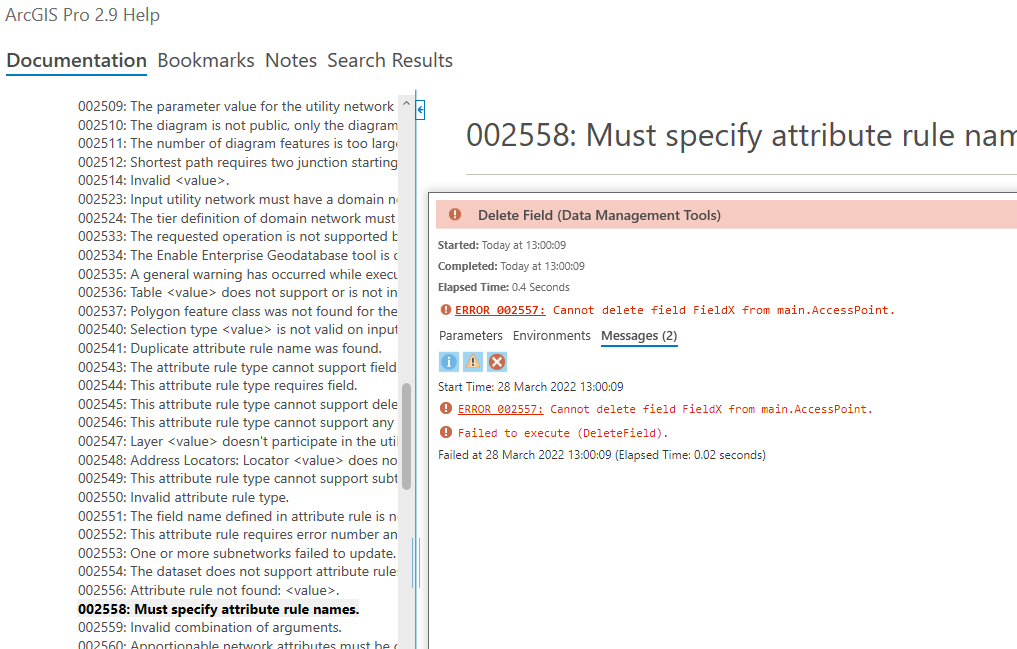
I ran the delete field tool deliberately on a geopackage to see what happens and I got an error message. This did not surprise me as I have read in the help that I cannot drop fields in a geopackage featureclass. Whilst that is something I would like ESRI to resolve what I was surprised is that there is no documentation on error code 002557 as you can see below.
002557 pops up in the strangest places for different reasons
BUG-000143509: The Delete Field tool in ArcGIS Pro fails to execute.. (esri.com)
# -- accessed via arcpy and numpy
# 2557 is there, must be new
messages
array([['2555',
        'The ArcGIS Data Store (relational) is in read-only mode and new items cannot be published. Please check available disk space.'],
       ['2556', 'Attribute rule not found: %s.'],
       ['2557', 'Cannot delete field %1 from %2.'],
       ['2558', 'Must specify attribute rule names.'],
       ['2559', 'Invalid combination of arguments.']], dtype='<U125')
@DanPatterson , interesting you found that bug report, I did search online help for the code and could not find anything specific. Interesting the error message is for a completely different scenario, deleting all fields in a shapefile and I was trying to simply delete a single field from a geopackage. Either way does seem like the help documentation needs to be updated.
Thank you for reporting this @DuncanHornby
We are going to treat this as a bug (something that needs fixing) instead of an idea (new feature request) I'm closing this Idea because I've opened an issue for it in our internal doc feedback repository.
Regards,
-Mark Z
Connectez-vous pour publier, suivre du contenu, et plus encore. Nouveau ici ? Inscrivez-vous gratuitement.