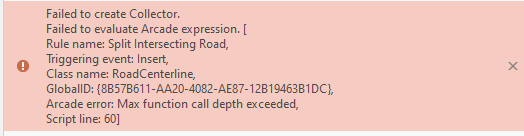
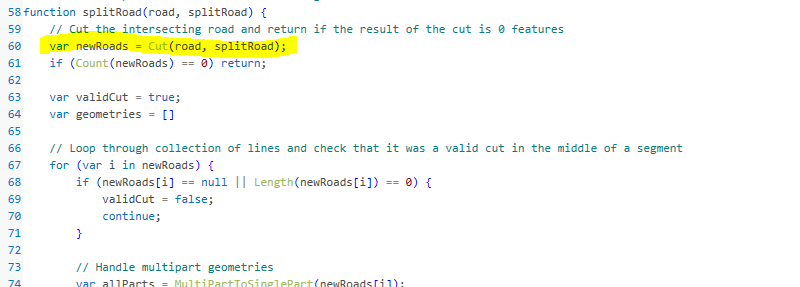
After updating to ArcGIS Pro 2.9.2 the the Split Intersecting Roads Attribute Rule no longer functions. It seems something was put in place to stop the iteration through split roads. When creating a new intersecting road I get the error message shown. the cut function. Anyone else having this problem?
@CochranBob, we were able to find the issue. It appears that the logic for Cut changed at 2.9 and rather than returning an empty array when the feature was not cut, it is returning 1 feature, the original geometry. So it is a fairly easy fix, on line 61 rather than checking if their are 0 features in the array, check if there are less than 2 features. See the screenshot below.
I am new to Pro and would like to get this tool to work with my current set of data. Is there a way to use this tool with my current set of data without all of the other stuff that goes with it? I just need the road split tool to split the centerline and then prorate the address range where the new intersecting road comes in.
Any help is appreciated!
You have to manually change it. The basic functionality of the arcade 'cut' function changed after the Address Management Solution was released. In Chris's response above he has the code line highlighted and edited where the change is needed to fix this problem. I would not expect this to be fixed until ESRI releases a new version of the Address Management solution accounting for the change in Arcade functionality, but you can fix it yourself based on his response.
Where do we find the script to update. I'm on 3.0 but it doesn't seem to be fixed in the upgrade.
Attribute Rules in the geodatabase. There are good examples in the Address Management Solution for addresses and Roads.
What file are you editing?
Thank you for the quick response on this. There is some really cool stuff in this solution. Nice work!
@CochranBob, I was able to reproduce this issue started with 2.9. It seems to occur if the road you sketch overlaps a road or touches more than one road. If it just touches one road the rule runs succesfully. We are looking into this now and will respond back with our findings and potential fixes to the rule.
I tried this and it did not seem to work. I went back to the downloaded original out of the box solution and am seeing this problem there as well
. Leads me to believe something changed in how the Arcade is being ran or that there is a new limitation.
1st make sure var 'road' is pointing to RoadCenterline. Secondly take a look at the trigger, it is set to trigger on insert. Try switching it to trigger on update?
Les membres connectés peuvent publier, suivre les mises à jour, et plus encore. Nouveau ici ? Inscrivez-vous gratuitement.
Find useful guides, FAQs, and documents to help you navigate and make the most of Esri Community.