Hello All,
I'm looking to modify the 'Full Address' attribute rule for a new field I created in the Address Data Management Solutions geodatabase. The new field that was created, 'CountyID', will contain unique values and will be a concatenation of four separate fields ('GridID', 'StreetID', 'Full Address Number', 'Address Unit Number'). The 'CountyID' field has a defined length of 18 characters, deliminated by a ".". The 'Grid ID' and 'StreetID' have a length of three (3) and four (4) characters respectively. The 'Full Address Number' and 'Address Unit Number' are four characters in length each. So for example the 'CountyID' would look something like "A01.X001.0547.0000". The issue I'm having is I would like to pad zero's in the script itself for the 'CountyID' field instead of padding zeros in one of the existing fields or having to create a separate field, with padded zeros, to run this expression. I want the 'CountyID' field to update as data is inputted in real-time rather than running a Field Calculator tool every so often. I'm not sure of the viability of this task and my knowledge of code is minimal but any insight or a better approach would be greatly appreciated. Below is a screenshot of the Attribute Table and slightly modified code that currently runs for the Full Address rule in the Attribute Rule module.
Thank you
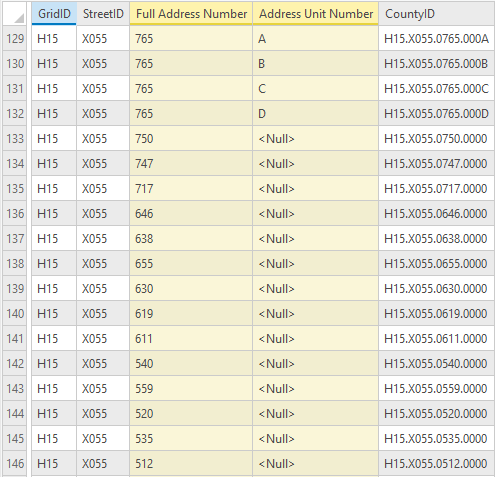
// This will calculate the CountyID for a site address point by concatenating several other field values

// Specify the fields to concatenate
var values = [$feature.GridID, $feature.StreetID, $feature.addrnum, $feature.unitid];

var combined_value = [];
// Loop through the field values and test if they are null or empty strings
// If they are not null or empty add them to an array
for (var i in values) {
    var value = values[i];
    if (IsEmpty(value)) continue;
    combined_value[Count(combined_value)] = value
}

// Return the field values concatenated with a space between
return Concatenate(combined_value, ".");

