After noticing some calculated areas using the Area function didn't look correct, I did some testing. I calculated acreage in three ways with arcade, using the 'Shape_Area/43560' method, The Area function, and the AreaGeodetic function. I also included pre-processed acreage for comparison.
Does anyone why the "Area" function returns a value so far from the others?
I appreciate any insight. Expressions and screenshot below.
Thank you
Chris
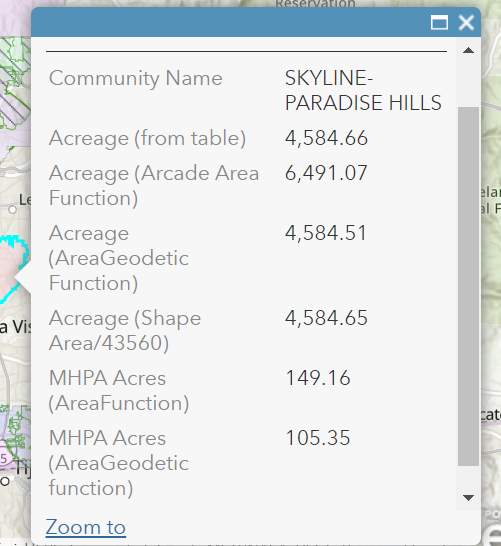
//Acreage (Shape Area/43560) (Pop-up)
$feature["Shape_Area"]/43560
//Acreage (Arcade Area Function) (Pop-up)
Area($feature, 'acres')
//Acreage (AreaGeodetic Function) (Pop-up)
AreaGeodetic($feature, 'acre')
//MHPA Acres (AreaFunction) (Pop-up)
var mhpas = Intersects(FeatureSetByName($map,"Multi Habitat Planning Area"), $feature);
var cnt = Count(mhpas);
var intersectArea = 0;
if (cnt > 0) {
for (var mhpa in mhpas) {
intersectArea += Area(Intersection($feature, mhpa),"acres")
}
}
return Round(intersectArea, 2);
//MHPA Acres (AreaGeodetic function) (Pop-up)
var mhpas = Intersects(FeatureSetByName($map,"Multi Habitat Planning Area"), $feature);
var cnt = Count(mhpas);
var intersectArea = 0;
if (cnt > 0) {
for (var mhpa in mhpas) {
intersectArea += AreaGeodetic(Intersection($feature, mhpa),"acres")
}
}
return Round(intersectArea, 2);


