Hi,
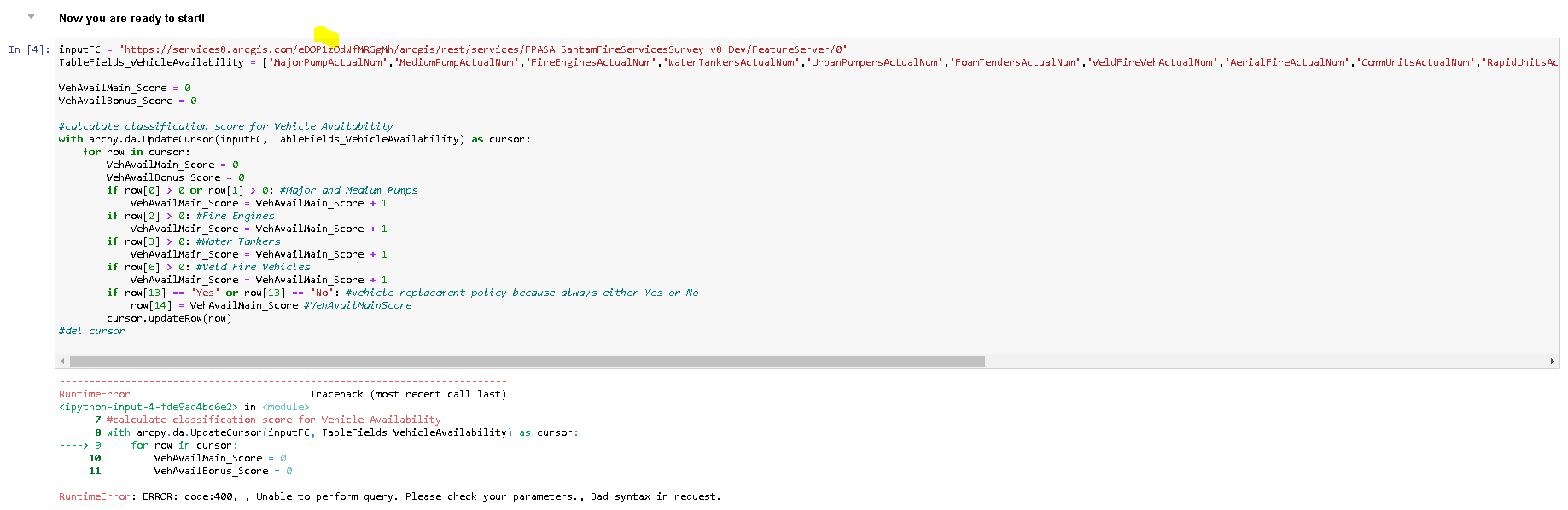
I am new to Jupyter notebooks in AGOL. I am trying to develop a script which updates a field in a hosted feature layer based on what has been entered in other fields. I am getting an error (code 400) pointing to the "for row in cursor:" line. This script works perfectly on my desktop machine. Any ideas as to what might be wrong? Here is what I am seeing in Notebook.
Thanks,
Grant
For one thing, ArcPy is only available in the advanced notebooks (the ones that cost you credits to run), so I'd make sure your notebook runtime is correct.
If you're working with hosted layers and AGOL, you're much better off using the ArcGIS Python API and spatially enabled dataframes. Here's a sample of how you might use it:
from arcgis import GIS

# Log in to portal; for AGOL notebooks, you can also use gis = GIS("home")
gis = GIS('portal-url', 'user', 'password')

# Get your hosted layer you want updated
fc = gis.content.get('itemID').layers[0]

# Query out all features to a dataframe
df = fc.query(out_fields=['the', 'fields', 'you', 'need'], return_geometry=False, as_df=True)

# Subset rows for those where 'field_a', etc., is greater than 0, add 1 to 'target_field'
df.loc[df['field_a'] > 0, 'target_field'] = df['target_field'] + 1
df.loc[df['field_b'] > 0, 'target_field'] = df['target_field'] + 1

# And so on

# Submit updated dataframe back to hosted layer as updates
fc.edit_features(updates=df.spatial.to_featureset())
It's quite different from using cursors, but once you get the hang of using dataframes (see the pandas docs for more info), it will become much, much easier. And more versatile, as pandas is widely used with other python modules, and can import/export a wide variety of file formats.
Rather than using a bunch of if statements, the pandas loc indexer is grabbing a selection of rows and columns from the dataframe and operating on them separately. Within loc[x, y], x represents the rows. Here we supply "df['field_a'] > 0", so we're getting back all the rows that meet the condition. y represents the columns, and specifying a single column by its label, 'target_field', gives us only those values we wish to update.
Setting that selection equal to the 'target_field' value + 1, the dataframe only grabs the value at the same index, so you don't have to specify a subset for that operation.
Hi Josh,
Thanks for the interesting response.
I am indeed using an advanced notebook.
I will take a look at the dataframes, but would also really like to solve the problem with the UpdateCursor.
Thanks again,
arcpy and arcpy.da are imported somewhere else in the notebook?
the error stems from the input featureclass name or location or the specified fields.
check both to make sure they "exist" in your code
Hi Dan,
Thanks a lot. Yes arcpy and arcpy.da are imported at the top of the notebook.
I found a small error in the fields list which I think was breaking it, so the error is now gone. However, now it doesn't seem to be resolving any of the if statements,. In fact it doesn't even appear to be stepping into the UpdateCursor. I tested this by putting a print statement directly after "for row in cursor:'. It runs with no error but isn't doing anyone of the assessments and incrementing the counter.
UpdateCursor—ArcGIS Pro | Documentation
that row (row[14]???? will only get updated in the last if statement
print the value prior to updating the row, I can't tell what is going on because flipping back and forth to the image is difficult. Try code formatting to make it easier to view code samples
Code formatting ... the Community Version - Esri Community
Sorry about the problems with image of the code.
Here is the code:
from arcgis.gis import GIS
gis = GIS("home")
import arcpy, arcpy.da, requests, json

inputFC = ''https://services8.arcgis.com/eDOP1zOdWfMRGgMh/arcgis/rest/services/?????/FeatureServer/0''
TableFields_VehicleAvailability = ['MajorPumpActualNum','MediumPumpActualNum','FireEnginesActualNum','WaterTankersActualNum','UrbanPumpersActualNum','FoamTendersActualNum','VeldFireVehActualNum','AerialFireActualNum','CommUnitsActualNum','RapidUnitsActualNum','FuelTendersActualNum','CrewBusesActualNum','FireBoatsActualNum','VehReplacePolicy','VehAvailMainScore']#,'VehAvailBonusScore','VehAvailCombScore']

VehAvailMain_Score = 0
VehAvailBonus_Score = 0

#calculate classification score for Vehicle Availability
with arcpy.da.UpdateCursor(inputFC, TableFields_VehicleAvailability) as cursor:
    for row in cursor:
        VehAvailMain_Score = 0
        VehAvailBonus_Score = 0
        if (row[0] > 0 or row[1] > 0): #Major and Medium Pumps
            VehAvailMain_Score = VehAvailMain_Score + 1
            print(row[1])
        if row[2] > 0: #Fire Engines
            VehAvailMain_Score = VehAvailMain_Score + 1
        if row[3] > 0: #Water Tankers
            VehAvailMain_Score = VehAvailMain_Score + 1
        if row[6] > 0: #Veld Fire Vehicles
            VehAvailMain_Score = VehAvailMain_Score + 1
        if (row[13] == 'Yes' or row[13] == 'No'): #vehicle replacement policy because always either Yes or No
            row[14] = VehAvailMain_Score #VehAvailMainScore
        print(VehAvailMain_Score)
        cursor.updateRow(row)
del cursor
'' .... ''
two single quotes surround your inputFC path. You said you found some issue with your field names. Are you still getting the same error message?
also all those
VehAvailMain_Score = VehAvailMain_Score + 1 #---- current
VehAvailMain_Score += 1  # ---- suggested
lines can be written as suggested
and
    for row in cursor:
        VehAvailMain_Score = 0  # ---- redundant
        VehAvailBonus_Score = 0 # ---- redundant
are defined outside the with statement and again within it. Do you want it redefined there as well?
two single quotes - sorry that is an error that crept in when I copied the code into the reply. The actual code I am testing has the inputFC in one set of single quotes.
I sorted out the issue with the field names and am no longer getting the error message, but the problem now is that the code doesn't seem to be getting into the UpdateCursor. None of the operations within the UpdateCursor are being fired. I placed some print statements within the UpdateCursor to test this and none of them print.
If it isn't getting to the cursor, then print statement outside are needed.
You indicate that it is supposed to be a featureclass. If so, then you should be able to print some of its properties. If that fails, then it isn't a featureclass, it doesn't exist or something else.
See FeatureClass properties—ArcGIS Pro | Documentation
Its a hosted feature layer in AGOL. I could share the rest endpoint address with you via Private Message?
Tested using the feature class properties (featureType and shapeType) and I got results so it is a feature class.
In the last incarnation of your script you had print statements, are any printing?
there are warnings about what is needed if the data are versioned etc
Using the code below the only print statements that print are print('in') and the last print statement print(VehAvailMain_Score).
Versioning - its an AGOL hosted feature layer. How do you know whether these are versioned? Editing is enabled, as is "Keep track of created and updated features" and "Keep track of who created and last updated features". The last two are suggestive of versioning.
from arcgis.gis import GIS
gis = GIS("home")
import arcpy, arcpy.da, requests, json

inputFC = 'https://services8.arcgis.com/eDOP1zOdWfMRGgMh/arcgis/rest/services/????/FeatureServer/0'
TableFields_VehicleAvailability = ['MajorPumpActualNum','MediumPumpActualNum']#,'FireEnginesActualNum','WaterTankersActualNum','UrbanPumpersActualNum','FoamTendersActualNum','VeldFireVehActualNum','AerialFireActualNum','CommUnitsActualNum','RapidUnitsActualNum','FuelTendersActualNum','CrewBusesActualNum','FireBoatsActualNum','VehReplacePolicy','VehAvailMainScore']#,'VehAvailBonusScore','VehAvailCombScore']

VehAvailMain_Score = 0
VehAvailBonus_Score = 0

#calculate classification score for Vehicle Availability
with arcpy.da.UpdateCursor(inputFC, TableFields_VehicleAvailability) as cursor:
    print('in')
    for row in cursor:
        print('in2')
        VehAvailMain_Score = 0
        VehAvailBonus_Score = 0
        if (row[0] > 0 or row[1] > 0): #Major and Medium Pumps
            VehAvailMain_Score += 1# VehAvailMain_Score + 1
            print('in3')
#        if row[2] > 0: #Fire Engines
#            VehAvailMain_Score = VehAvailMain_Score + 1
#        if row[3] > 0: #Water Tankers
#            VehAvailMain_Score = VehAvailMain_Score + 1
#        if row[6] > 0: #Veld Fire Vehicles
#            VehAvailMain_Score = VehAvailMain_Score + 1
#        if (row[13] == 'Yes' or row[13] == 'No'): #vehicle replacement policy because always either Yes or No
#            row[14] = VehAvailMain_Score #VehAvailMainScore
        cursor.updateRow(row)
del cursor
print(VehAvailMain_Score)
Made a little progress. I adjusted the cursor from an UpdateCursor to a SearchCursor and removed cursor.updateRow(row). The script then successfully runs and completes with the print statements reporting as would be expected.
So this makes me think that there is an issue with the edit settings or sharing of the hosted feature layer? although the user running the script owns the hosted feature layer so sharing shouldn't be the issue. Any idea what settings and sharing are required for the hosted feature layer for it to be editable in this manner?
So I adjusted the settings so that only "Enable Editing" is ticked on and only "Update" and "Attributes only" is allowed. The UpdateCursor was then reinstated in the script. The script runs for a few minutes and then the Notebook returns the following message:
No clue. This may be a Tech Support issue now
Thanks a lot for the help. I have contacted our local ESRI office.
Regards,
Les membres connectés peuvent publier, suivre les mises à jour, et plus encore. Nouveau ici ? Inscrivez-vous gratuitement.
Find useful guides, FAQs, and documents to help you navigate and make the most of Esri Community.