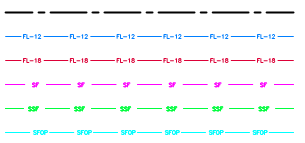
I am trying to add some text to lines similar to the screenshot below from an erosion and sediment control plan. How do I go about changing the symbology of lines to create similar lines as this? Do I need to first create pictures of the text and use a picture as the marker symbol? It would seem like I could include text as the marker somehow.
Thanks! Much closer now. How do I get the line breaks under the text? do I need to use a dashed line and try to get the gaps to match the placement of the text?
I think it would be a careful configuring of the dash pattern, yes, unless there's a "masking" setting I am unaware of on the symbol layer effects.
I came up with one step better...First tryfinal
First add the shape with the number 1 in it. Change the color to white. Then toggle the 'Shape Point Symbol' box. Format your text and text string.
It isn't perfect, but it works.
"Kubes"
Here are a couple of snips...
How can we do it for polygons?
Les membres connectés peuvent publier, suivre les mises à jour, et plus encore. Nouveau ici ? Inscrivez-vous gratuitement.
Find useful guides, FAQs, and documents to help you navigate and make the most of Esri Community.