I'm having trouble with a question label not appearing in my survey when it's being used in the browser-based Web App.
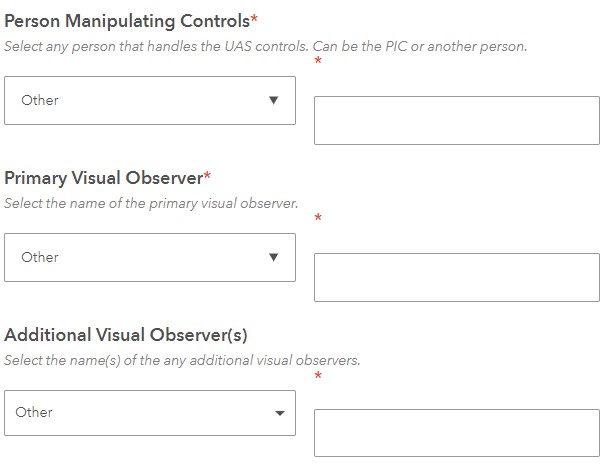
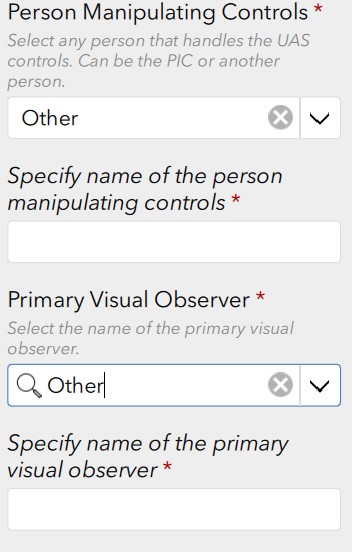
This survey has a number of select-ones and select-multiples with an 'Other' choice which triggers a relevant text box for users to enter the name of the Other item. In the web form, the label for the Other field does not show up and the text box is awkwardly to the side. The text box and label display as expected when using the Field App. I've tried some label formatting, like adding a <br>break</br>, but it hasn't solved the Web App issue & makes the Field App look awkward. How can I make the ‘other’ question label show up?
In the web app, missing question label and awkwardly placed
In the field app, with appropriate question label
There have been previous similar issues and none of the suggested solutions have helped. The survey was most recently published using Connect version 3.11.123. I have opened the web form with a Microsoft Edge browser on Windows 10 desktop and Safari on iOS 14 and issues show up on both browsers. The survey is already set to “Use the version the survey was published with” (which was one suggested solution in an earlier post).
Formatting Options for Web Form - GeoNet, The Esri Community
Survey123 Question Labels Not Appearing - GeoNet, The Esri Community
Thanks for any suggestions that folks may have!





