Hi -
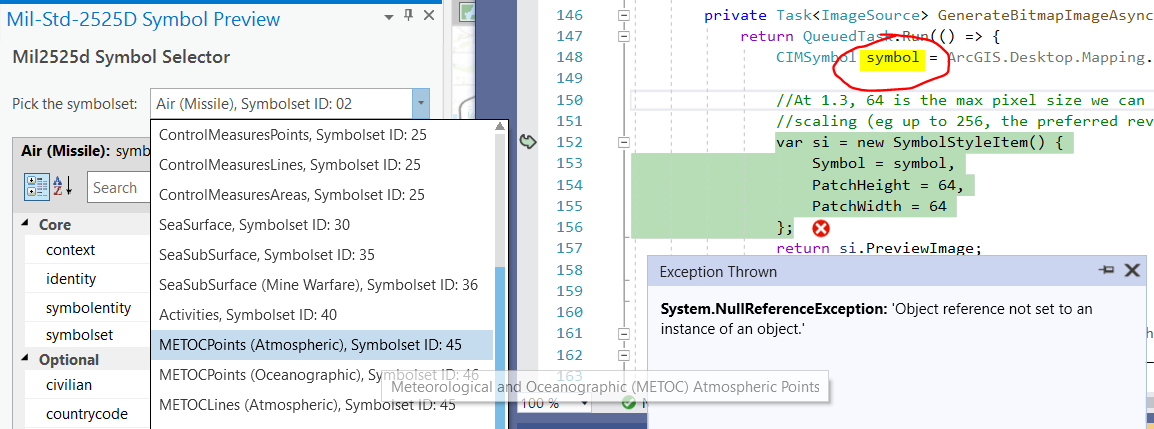
Using Pro 2.7 and data from CommunitySampleData-12-15-2020, when I choose the METOCPoints (Atmospheric), SymbolsetID:45 in the DictionarySymbolPreview sample I get a null reference exception.
I wonder if something's not configured correctly.
Thanks, Kirk
This is probably a separate issue: exception when opening DictionarySymbolView designer (cannot find actipro toolwindow).
Severity Code Description Project File Line Suppression State
Error Type reference cannot find type named '{clr-namespace:ActiproSoftware.Windows.Controls.Docking;assembly=ArcGIS.Desktop.Docking.Wpf}ToolWindow'. DictionarySymbolPreview D:\repos\esri\arcgis-pro-sdk-community-samples\Map-Authoring\DictionarySymbolPreview\UI\DictionarySymbolView.xaml 19
To reproduce:
Open sln, notice nuget packages are broken, so update to 4.0.2 ...
Clean and rebuild, no errors.
Open the DictionarySymbolView in designer and see error.
Kirk, I dug into this a little deeper.
It looks like, in some cases, particular symbolsets have a "000000 - Unspecified" symbol entity as the default. The Atmospheric symbols - symbolset 45 and 46 as examples. So the initial pick of the METOCPoints, Lines, Polys triggers a search for the default entity: "symbolentity 0". Now, I _think_ the GetDictionarySymbol used to return a default symbol for undefined entities?? - but it could just be a bug in the sample - anyway, when I select a "real" entity from the symbolentity drop down (i.e. something other than 000000 - eg 110100), I get the correct symbol retrieved and loaded.
I think the best thing to do is simply wrap the GetDictionarySymbol call in a try/catch to prevent the null symbol being returned from blowing up the dockpane in those cases where an unspecified "000000" symbol is being requested.
private Task<ImageSource> GenerateBitmapImageAsync(Dictionary<string, object> attributes) {
            return QueuedTask.Run(() => {
              try {
                CIMSymbol symbol =
 ArcGIS.Desktop.Mapping.SymbolFactory.Instance.GetDictionarySymbol(
         "mil2525d", attributes);
                var si = new SymbolStyleItem() {
                  Symbol = symbol,
                  PatchHeight = 64,
                  PatchWidth = 64
                };
                return si.PreviewImage;
              }
              catch(NullReferenceException) {
                return null;
              }
            });
        }
Starting with a fresh MilitaryOverlay.aprx from the zip file, I see a ! next to the stylx:
I clicked and browsed for:
"C:\Program Files\ArcGIS\Pro\Resources\Dictionaries\mil2525d\mil2525d.stylx"
and the ! cleared.
Still get null ref exception though.
Hi Kirk, looks like a bug in GetDictionarySymbol. I'll keep u posted.
~Hi Kirk, the sample is designed for use with "mil2525d". To change it you would have to replace that literal string with the name of your dictionary. However, I think the property grid expects mil2525d entities also so that might break also but it's been quite a few years since I wrote that sample and I don't remember all the details.~
scratch that - I see u are using mil2525d. I'm not sure off the top of my head. Looks like the GetDictionarySymbol call does not find your selected symbol and, off the top of my head, I dont know why
Les membres connectés peuvent publier, suivre les mises à jour, et plus encore. Nouveau ici ? Inscrivez-vous gratuitement.
Find useful guides, FAQs, and documents to help you navigate and make the most of Esri Community.