The method SetViewpointCenterAsync doesn't actually set the view point to the center of the control on iOS but slightly above it. This does not happen on Android.
You can easily see this, if you have an active location source displayed and use this to center like this:
MapView.SetViewpointCenterAsync(MapView.LocationDisplay.Location.Position);
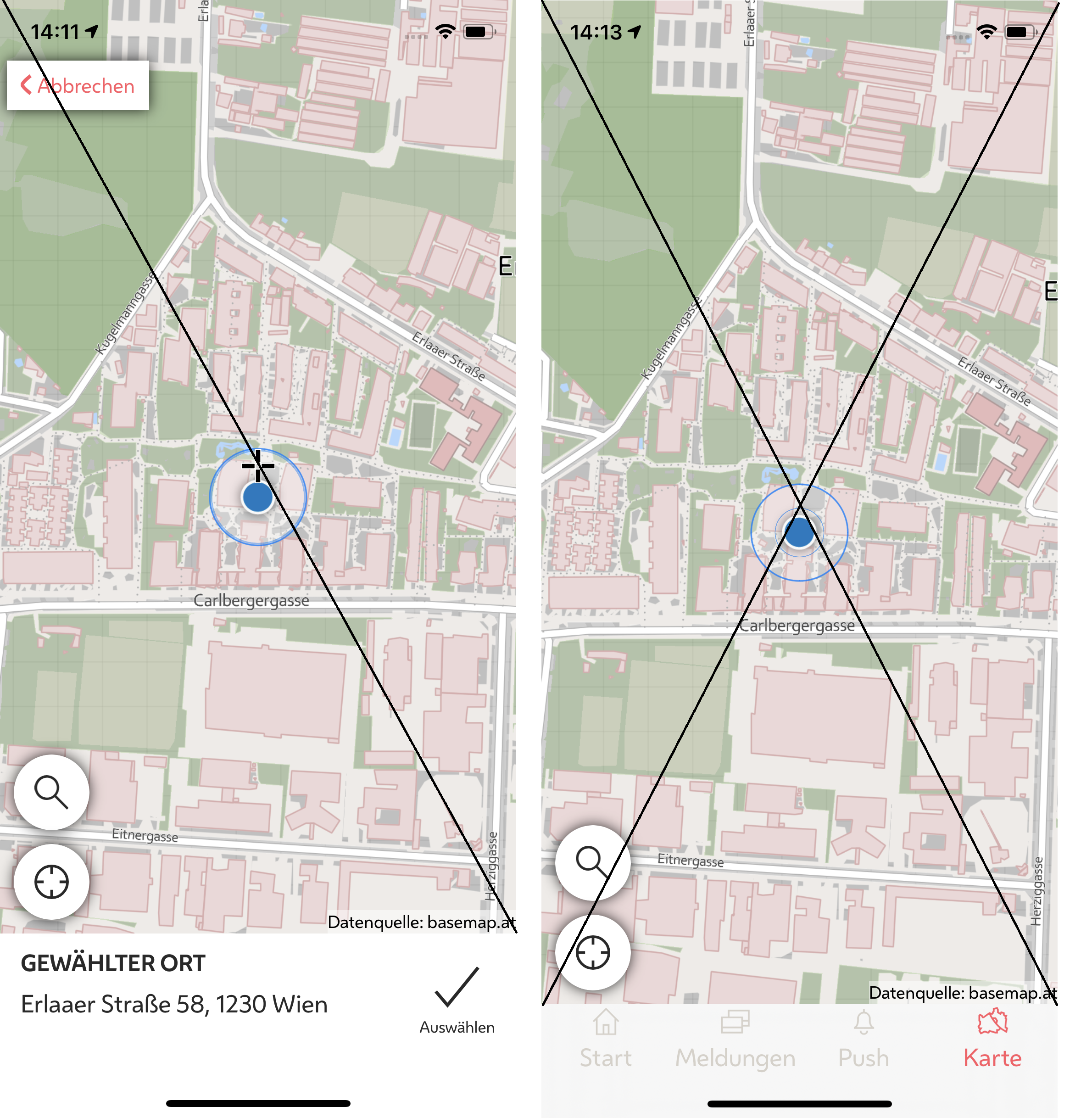
The first screenshot includes a cursor image, where the correct center should be using a Xamarin AbsoluteLayout like this:
<AbsoluteLayout>
    <esriUI:MapView x:Name="MapView"
                    AbsoluteLayout.LayoutFlags="All"
                    AbsoluteLayout.LayoutBounds="0,0,1,1"/>
    <!-- Cursor -->
    <ffimageloadingsvg:SvgCachedImage x:Name="Cursor"
                                      AbsoluteLayout.LayoutFlags="PositionProportional"
                                      AbsoluteLayout.LayoutBounds="0.5,0.5,AutoSize,AutoSize"
                                      WidthRequest="25" HeightRequest="25"/>
</AbsoluteLayout>
My guess is, that the MapView somehow included the screen dead zone / area insets in it's center point calculation. I haven't found any property to disable this though.
Esri ArcGIS Runtime version 100.12.0. Screenshots taken on iPhone X.

