Working on a work-around for another conundrum and tried the following:
import arcpy
x = some X
y = some Y
point = arcpy.Point(x,y)
ptGeometry = arcpy.PointGeometry(point)
feature_class = arcpy.CreateFeatureclass_management("in_memory", "tempfc", "POINT")[0]
with arcpy.da.InsertCursor(feature_class, ["SHAPE@XY"]) as cursor:
cursor.insertRow(ptGeometry)
aprx = arcpy.mp.ArcGISProject("CURRENT")
symbologyLayer = r"<some path>...\someSymbology.lyrx"
arcpy.management.ApplySymbologyFromLayer(feature_class,symbologyLayer)
# Interestingly, the following works too
#arcpy.ApplySymbologyFromLayer_management(feature_class,symbologyLayer)
map = aprx.listMaps()[0]
map.addDataFromPath(feature_class)
So this works great in that I'm getting a symbol plotted where I needed. But it does that three (3) times giving me the following output.
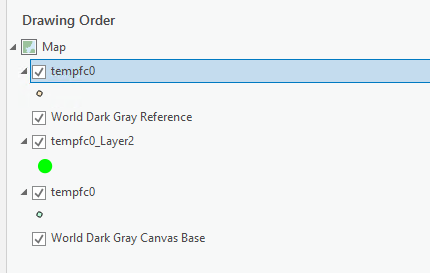
Now, I realize I could try and control the place of insertion by using addLayer() and using the LYRX file directly after updating its data source. But the above output is not what I would expect based on what I'm doing. What's going on there?


