We have a service deployed at: http://www.agr.gc.ca/atlas/rest/services/mapservices/aafc_canada_land_parcels/MapServer. Using ESRI JSAPI 3.13 (but also seen in 3.9 so it's been like this for a while if not always), the Legend widget doesn`t appear to be handling this service properly.
The first image below shows how the service is defined. Note that the "Manitoba Township Fabric" is toggled ON and is within visible range given the map at right, but because its "Manitoba" parent group is toggled OFF, that feature class doesn't appear in the mapâ¦which is as expected. The second image shows what the map looks like when the "Manitoba" group is toggled ON and the "Manitoba Township Fabric" feature class is displayed in the map.
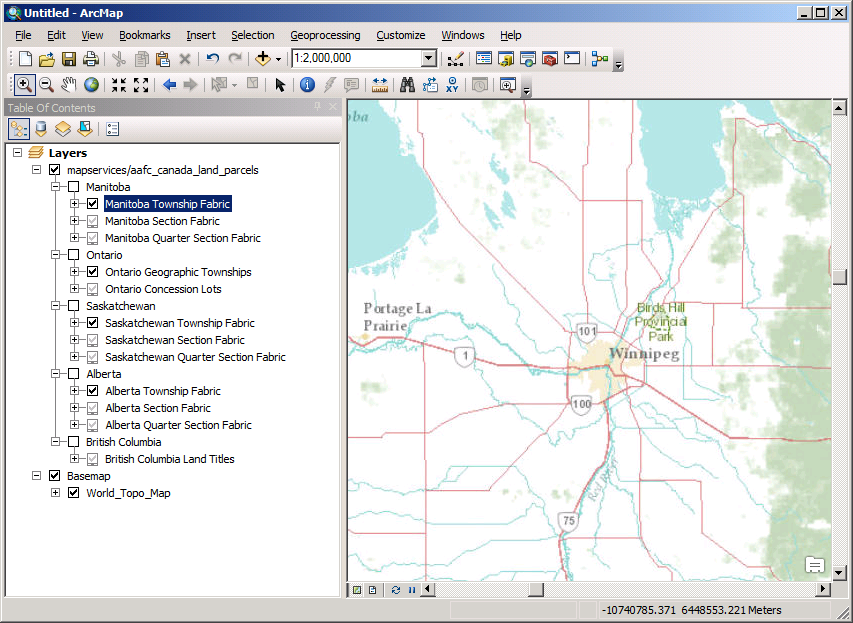
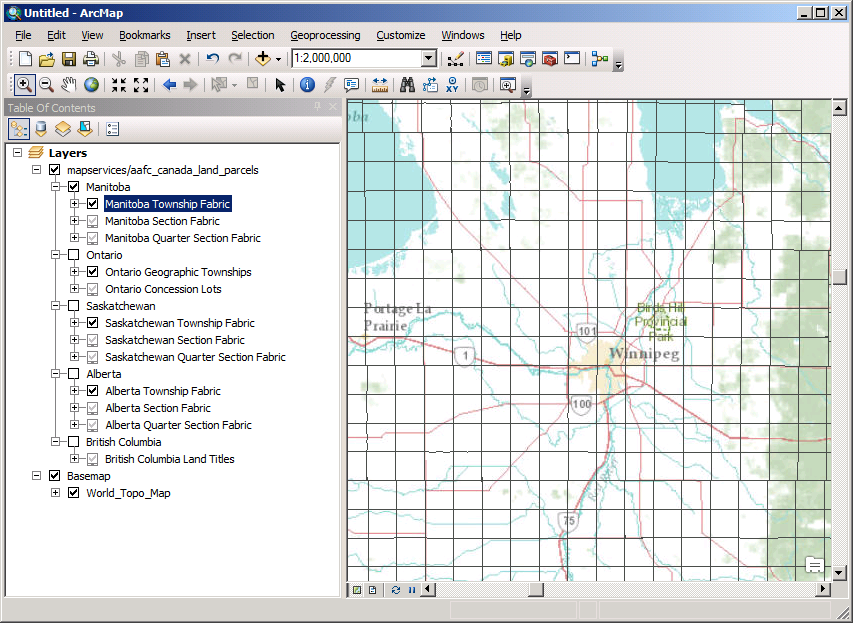
Now, with respect to the ESRI JSAPI, I pulled the sample below from https://developers.arcgis.com/javascript/jssamples/widget_legendvisible.html and updated it to use the service in question.
<!DOCTYPE html>
<html>
  <head>
    <meta http-equiv="Content-Type" content="text/html; charset=utf-8">
    <!--The viewport meta tag is used to improve the presentation and behavior of the samples
    on iOS devices-->
    <meta name="viewport" content="initial-scale=1, maximum-scale=1,user-scalable=no">
 <title>Updating the legend to display visible layers</title>

    <link rel="stylesheet" href="http://js.arcgis.com/3.13/dijit/themes/claro/claro.css">
    <link rel="stylesheet" href="http://js.arcgis.com/3.13/esri/css/esri.css">
<style>
    html, body {
      height: 97%;
      width: 98%;
      margin: 1%;
    }

    #rightPane {
      width: 20%;
    }

 #legendPane {
      border: solid #97DCF2 1px;
    }
</style>

    <script src="http://js.arcgis.com/3.13/"></script>
<script>
var map;

require([
 "esri/map",
 "esri/arcgis/utils",
 "esri/dijit/Legend",
 "esri/layers/ArcGISDynamicMapServiceLayer",
 "dojo/dom",
 "dojo/dom-construct",
 "dojo/parser",
 "dojo/_base/array",
 "dijit/form/CheckBox",
 "dijit/layout/AccordionContainer",
 "dijit/layout/BorderContainer",
 "dijit/layout/ContentPane",
 "dojo/domReady!"
        ],
 function (
 Map, utils, Legend, ArcGISDynamicMapServiceLayer, dom, domConstruct,
 parser, arrayUtils, CheckBox
        ) {

 parser.parse();

 var legendLayers = [];

 map = new Map("map", {
                              basemap: "topo",
                              center: [-97, 50],
                              zoom: 8
                          });

            var lyrParcels = new ArcGISDynamicMapServiceLayer("http://www.agr.gc.ca/atlas/rest/services/mapservices/aafc_canada_land_parcels/MapServer", {
 id: 'landparcels'
 });

 legendLayers.push({ layer: lyrParcels, title: 'Land parcels' });

 map.on('layers-add-result', function () {
                       var legend = new Legend({
 map: map,
 layerInfos: legendLayers
 }, "legendDiv");
                       legend.startup();
 });
 map.addLayers([ lyrParcels ]);
        });
</script>
 </head>

  <body class="claro">
    <!--[if IE 7]>
 <style>
    html, body {
    margin: 0;
    }
 </style>
 <![endif]-->
    <div id="content" data-dojo-type="dijit/layout/BorderContainer"
 data-dojo-props="design:'headline', gutters:true"
 style="width: 100%; height: 100%; margin: 0;">

      <div id="rightPane"
 data-dojo-type="dijit/layout/ContentPane"
 data-dojo-props="region:'right'">

 <div data-dojo-type="dijit/layout/AccordionContainer">
 <div data-dojo-type="dijit/layout/ContentPane" id="legendPane"
 data-dojo-props="title:'Legend', selected:true">

 <div id="legendDiv"></div>

 </div>

 <div data-dojo-type="dijit/layout/ContentPane"
 data-dojo-props="title:'Natural Disasters'">

 <span style="padding:10px 0;">Click to toggle the visibility of the various natural disasters</span>

 <div id="toggle" style="padding: 2px 2px;"></div>

 </div>
        </div>
 </div>
      <div id="map"
 data-dojo-type="dijit/layout/ContentPane"
 data-dojo-props="region:'center'"
 style="overflow:hidden;">
 </div>
 </div>

 </body>
</html>When the page is loaded in a browser it appears as you see below. The "Manitoba Township Fabric" (among others) appears in the Legend even though it is, correctly, not shown in the map. The Legend digit doesn't appear to be taking into consideration the fact that a group containing a "visibleLayer" may be toggled OFF and, therefore, not actually in the map and probably shouldn't be in the Legend either.
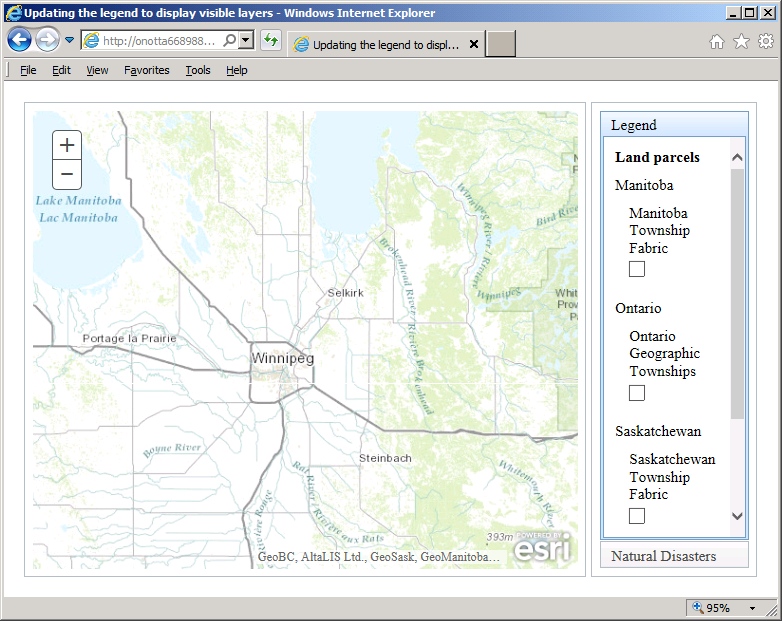
Can anyone tell me if this is by design? And, if so, what the logic behind showing these items in the Legend dijit is when, given the default visibility flag of their parent, there's no way they could actually appear in the map above?
I have worked around this problem in my own web mapping application by changing the visibleLayers array when the service is added to its map and removing those layers that have a parent that is toggled OFF somewhere up the chain but I thought I'd bring this up in case it is not "by design" and, instead, an oversight in the Legend dijit functionality.



