Hello everyone. I have added a template picker to an application that contains 3 feature layers. When the application loads, the template picker appears as it should (in order):

However, if I refresh the browser, the ordering can change:

When refreshing again:

And a final refresh:

As you can see, the order of which the template picker is populated changes each time. There are no errors in console mode. The layers appear in the following order at the rest endpoint
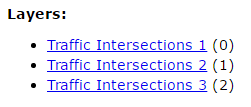
Feature services are hosted on arcgisonline.
My template picker code is as follows:
// Template Picker
var templatePicker = new TemplatePicker({
featureLayers: layers,
rows: "auto",
columns: 3,
grouping: false
}, "templatePickerDiv");
templatePicker.startup();
// Template Picker Widget - Selection Only Add Point
var selectedTemplate;
templatePicker.on("selection-change", function() {
if( templatePicker.getSelected() ) {
selectedTemplate = templatePicker.getSelected();
console.log("Name", selectedTemplate);
drawToolbar.activate(Draw.POINT);
}
});
Is there a way to get around this issue? How can I keep the layer ordering locked in going 1,2,3. I cannot have users bouncing all over the place to add a graphic to a map.
Has anyone else experienced this issue?


