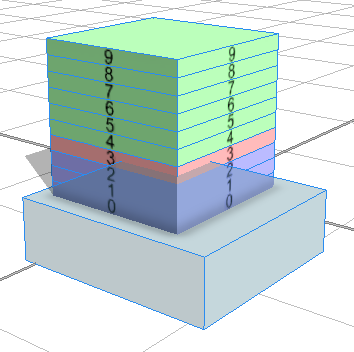
I'm dividing a building into horizontal slices and running an occlusion query, which colors the slices according to the touch results. I'd like to color the last slice touched in a different color. However, I can't figure out how to actually catch the last index. When I print the split.index the results are ordered in the console, suggesting that there does seem to be a way to catch the last split. Is it possible?
Rule:
version "2015.2"


attr SplitAccuracy = 10
attr BuildingHeight = 200
attr TouchColor = "#AAAAFF"
attr BuildingColor = "#AAFFAA"
attr LineColor = "#FFAAAA"
attr SplitCount = 0


@StartRule
Lot -->
  extrude(1)
  s(100,BuildingHeight,100) center (xz)
  SplitBuildings


SplitBuildings -->
  split(y){SplitAccuracy:CompBuildings}*


CompBuildings -->
  comp(f) {top : TouchCheck | side : Numbering}


Numbering -->
  set(SplitCount, split.index)
  texture("assets/no/no_"+SplitCount+".png")
  alignScopeToGeometry(zUp, 0, world.lowest)
  setupProjection(0, scope.xy, '1.0000, '1.0000)
  projectUV(0)
  TouchCheck


TouchCheck -->
  case touches(inter): TouchedRedlineCase
  else : NotTouched

TouchedRedlineCase -->
  #"case split.index == last split.index: LineColorColor"
  case split.index == 3 : LineColorColor
  else: TouchColorColor


NotTouched --> color(BuildingColor)
LineColorColor --> color(LineColor)
TouchColorColor --> color(TouchColor)Result, with manual setting of the split index: