I'm using the Story Map Series template for one of our AGOL web apps. I have information that I want to show in the sidebar, and this information is best presented in a table.
I can create the table just fine - no problem with that. But when I view the app, it shows the table borders, as shown in this screenshot:
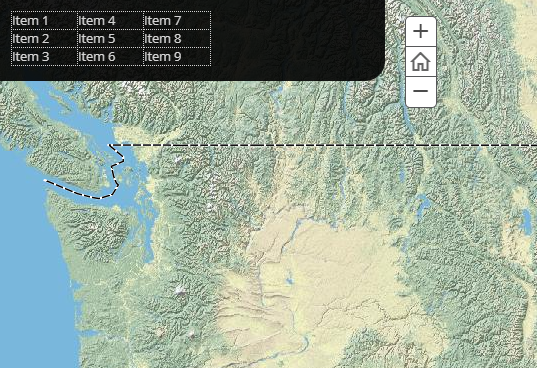
I don't want the table borders to show. I thought about using the <style> tag to make the borders black, but I haven't been able to get that to work.
Here's the code that I'm using to create the table:
<table border="1" bordercolor="black" cellpadding="0" cellspacing="0" width="200">
    <tbody>
        <tr>
            <td>Item 1</td>
            <td>Item 4</td>
            <td>Item 7</td>
        </tr>
        <tr>
            <td>Item 2</td>
            <td>Item 5</td>
            <td>Item 8</td>
        </tr>
        <tr>
            <td>Item 3</td>
            <td>Item 6</td>
            <td>Item 9</td>
        </tr>
    </tbody>
</table>
Any ideas on how I can make the table borders invisible?
Thanks.


