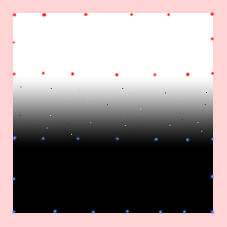
I'm trying to create a smooth raster gradient between 1 and 0 that I can then use in Raster Calculator.
See attached (this is a mockup drawn in photoshop - my actual data is offline)
I have input a series of points with value = 1 (red)
and a series with value = 0 (blue)
I expect a nice smooth gradient between the points but I actually get a kind of salt and pepper effect (as shown).
I have found that the effect is very much reduced (but not totally) by using the default cell size however the default it too large, I need a nice small cell size for my RasterCalculator step.
Anyone know what's going on here and how I can completely eliminate these defects?