Have you ever wanted to find all the errors in your in the utility network, but you weren't sure how to query the dirty areas table to filter our unvalidated edits from errors? This article has you covered!
If you've looked at the dirty area before you have seen it has many different status values:
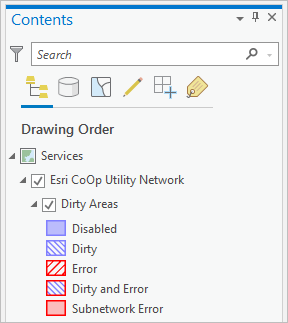
If you've look at how these values are defined for the layer, you will see that they are calculated using an Arcade Expression.
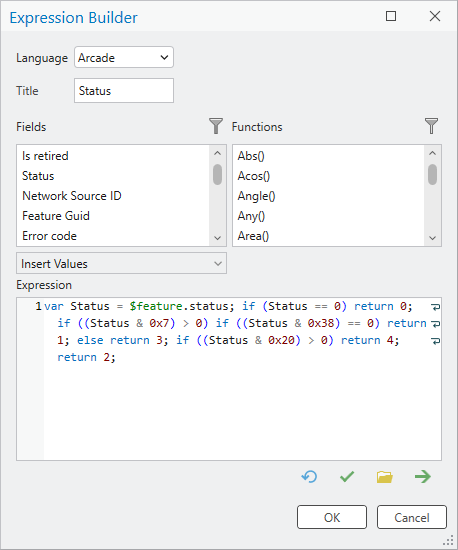
So how do you use that expression in something like Select By Attributes or a Definition query?
The secret to filtering out edits is to know that the status field represents multiple states at the same time. That is to say that while a dirty area not only represents features that are need validating (i.e. dirty) or have errors, but a single dirty area can also represent a feature that has an error that needs to be re-validated. All using the same field!
If all you care about is finding features that have error, you can use the simple expression: STATUS >= 8
But what if you want to know what kind of error (Feature, Object, Subnetwork)? For that, you have to use a more complicated expression.
First you need to know what kind of error you're looking for to determine its Status Code or its calculated value.
Feature Error: STATUS in (8, 24, 40)
Object Error: STATUS in (16, 24, 56)
Subnetwork Error: STATUS in (32, 40, 56)
It is also possible to use BITWISE and operators to perform the calculations, but because that operator is implemented differently across different DBMS platforms (and is not available in File Geodatabases) it is simpler to use an In List.
However, if you wanted to find dirty areas that need validation you WOULD need to use a BITWISE comparison to find errors with the first, second, and third bits set. The Validate Network Topology tool filters out these dirty areas when it runs, so this is more of a reporting check to ensure that nothing needs to be validated. You can learn how to write a query that does a bitwise comparison or learn how to parse specific error codes, in the article about querying the dirty areas table.
You can find the online help topic for Dirty Areas to learn more about the fields on the Dirty Area layer.
If you want to see some industry specific blogs or some hands-on tutorial for managing errors, check out the connectivity and topology learning series.
If you want to create a report of all the errors in your utility network, check out the Summarize UN Errors tool from the ArcGIS Solutions team.
