Refer to BUG-000176704 which has been replicated by many but now deemed designed behaviour.
Note: between all the cooks in the kitchen, the bug description is incorrect in some aspects.
When you select any text or numbers from the attributes in a popup, in many cases you will end up with a leading space in front of the copied text or numbers.
When you paste it into another app or field, you may not see the leading space and it can cause data issues later on.
Esri apparently thinks this a feature and expected behaviour.
Please fix Pro so that you can copy any attribute text or numbers from a popup without a leading space.
Example:
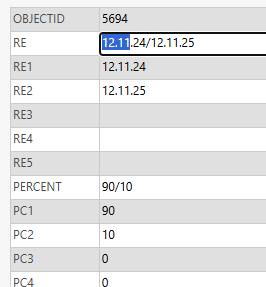
I've selected the following to add into a pivot query in Excel. Guess what - Pro copied a space in front of the selection. Note that the attribute does not have a leading space. This an artefact of the way Pro is built.
The Esri workaround is to double-click the record to select everything, copy/paste it, then delete what you don't want.
Funny thing is, if you double click a record it DOES NOT SELECT THE WHOLE RECORD.
If your text contains certain characters you have to click at least 3 times to select the whole record; make sure to time it just right otherwise Pro will lose a click.
So.
Instead of just building it properly, Esri recommends 3 Clicks > Copy > Paste > Select > Delete instead of just Select > Copy > Paste.
The root cause is the user inadvertently going over the cell boundary and copying what ends up to be a dividing tab/space artefact. In my opinion, if you design a UI badly, and then a user is not being able to not colour outside the lines so to speak, it doesn't sit well when you blame the user.
There is no visual hint that more than the expected text has been selected. Start there and then work towards the logic of preventing the problem rather than just visually showing there is a problem.
