I'm trying to automate the creation of a layout that includes a scale bar.
I want the size determined by the division value (2000 when the layout is first created), so I need to set the fitting strategy property to "Adjust width". This is what it would look like ideally:
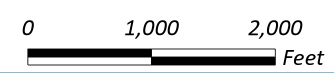
I'm able to make a scale bar, but I'm having a hard time setting it up properly. Currently it still has "Adjust division value" as the fitting strategy, and is in miles. In fact nothing is updating after the line that originally creates the bar. Looks like this:

This is what I have so far:
sbName = 'Double Alternating Scale Bar 1'
sbStyle = aprx.listStyleItems('ArcGIS 2D', 'Scale_bar', sbName)[0]
sb = lyt.createMapSurroundElement(geometry = arcpy.Point(1, 9), mapsurround_type = 'Scale_bar', mapframe = main_map_frame, style_item = sbStyle, name = 'New Scale Bar')
lyt_cim = lyt.getDefinition('V3')
for elm in lyt_cim.elements:
if elm.name == 'New Scale Bar':
elm.FittingStrategy = "AdjustWidth"
elm.Division = 2000
elm.Divisions = 1
elm.Subdivisions = 1
elm.MarkFrequency = "DivisionsAndFirstMidpoint"
elm.MarkPosition = "AboveBar"
elm.Units = "Feet"
lyt.setDefinition(lyt_cim)
aprx.save()
I'm referring mostly to these sources:
https://pro.arcgis.com/en/pro-app/3.3/arcpy/mapping/mapsurroundelement-class.htm
https://pro.arcgis.com/en/pro-app/latest/sdk/api-reference/topic4880.html




