Short story: symbols that work in Pro 3.3, Map Viewer and Instant Apps are not rendering correctly in Experience Builder.
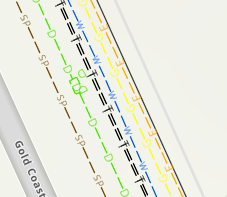
I have created custom line symbols that are dashed with 1 or 2 characters indicating which utility they represent. It’s important that the characters are not overlapped by lines for readability, so I have configured the dashes and character spacing and repeats.
This is how it looks in Pro, in a Web Map Viewer, and in an Instant App (perfect, no issues):
And this is how it looks in EB – spacing all off:
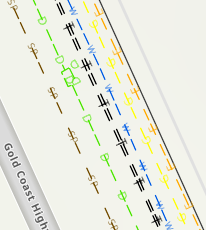
I have opened a fresh new Experience Builder and a fresh new Map Viewer with only this layer to ensure I haven’t set some kind of symbol rendering, and it’s always the same. EB just won’t honour the symbology at any zoom level from either the web style or ArcGIS Pro. I thought this was an issue going the other way – that Web App Builder would be the issue, so I’m not able to find any help docs on this.
Running Pro 3.3
Working with Experience Builder App built via AGO
Map Viewer is the new one, not classic
Symbols tested published 3 ways:
- as a Web Style where the symbology is applied after publishing
- where the symbology is applied at the point of publishing in ArcGIS Pro
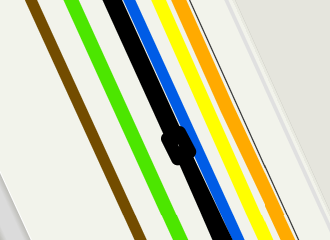
- where symbology applied at the point of publishing in Pro, but is downgraded
Downgraded symbols are not the solution:
The first two publishing attempts listed above result in the exact same outcome (it works everywhere except EB). Is this a known issue? I thought building my app in EB would save me issues like this, but it seems like if I want my users to have the right symbols, I will need to convert it to an instant app.




