Good morning, I would like to customize the colors of the standard buttons on the map. However, only part of the buttons are being changed. Does anyone have an idea? Best regards, Alex
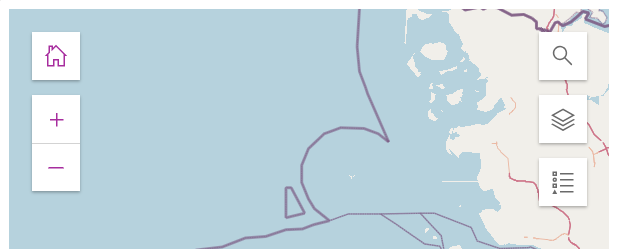
<html>
  <head>
    <meta charset="utf-8" />
    <meta name="viewport" content="initial-scale=1, maximum-scale=1, user-scalable=no" />
    <title>...</title>
    <!-- Load Calcite components from CDN -->
    <link rel="stylesheet" type="text/css" href="https://js.arcgis.com/calcite-components/2.13.2/calcite.css" />
    <script type="module" src="https://js.arcgis.com/calcite-components/2.13.2/calcite.esm.js"></script>
    <!-- Load the ArcGIS Maps SDK for JavaScript from CDN -->
    <link rel="stylesheet" href="https://js.arcgis.com/4.31/esri/themes/light/main.css" />
    <script src="https://js.arcgis.com/4.31/"></script>
    <!-- Load Map components from CDN-->
    <script type="module" src="https://js.arcgis.com/map-components/4.31/arcgis-map-components.esm.js"></script>
    <style>
      html,
      body {
          padding: 0;
          margin: 0;
          height: 100%;
          width: 100%;
      }
      calcite-list, /* layer list button */
      calcite-button { /* standard button */
        --calcite-color-text-1: #bd11a3; /* HOVER */
        --calcite-color-text-3: #bd11a3; /* NORMAL */
        /* --calcite-color-text-2: #bd11a3; */ /* font layer */
      }
    </style>
  </head>
  <body>
    <arcgis-map item-id="21d542a69db3442f808d92e2618f1390">
      <arcgis-home position="top-left" ></arcgis-home>
      <arcgis-zoom position="top-left" ></arcgis-zoom>
      <arcgis-expand position="top-right" mode="floating">
        <arcgis-search />
      </arcgis-expand>
      <arcgis-expand position="top-right" mode="floating">
        <arcgis-layer-list />
      </arcgis-expand>
      <arcgis-expand position="top-right" mode="floating">
        <arcgis-legend />
      </arcgis-expand>
      <arcgis-scale-bar position="bottom-left" bar-style="line" unit="metric"></arcgis-scale-bar>
    </arcgis-map>
  </body>
</html>



