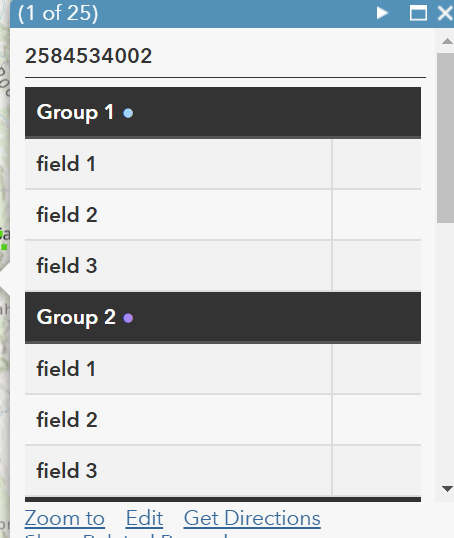
Las etiquetas HTML th no funcionan correctamente en el nuevo Visor de mapas, pero sí funcionan bien en el visor anterior. Adjunto un código de ejemplo. Todos los encabezados se apilan en la parte superior del HTML, por lo que las celdas td quedan debajo de todas las etiquetas th.
<table style="width: 99%; border-collapse: collapse;">
<tr>
<th colspan="2" style="padding: 8px; text-align: left; border-bottom: 2px solid #555; background-color: #333; color: white; font-weight: bold;">
Grupo 1 <span style="color: #a2d2ff;">●</span>
</th>
</tr>
<tr style="background-color: #f2f2f2;">
<td style="padding: 8px; text-align: left; border-bottom: 1.4px solid #ddd; border-right: 1.4px solid #ddd; font-weight: 550;">campo 1</td>
<td style="padding: 8px; text-align: left; border-bottom: 1.4px solid #ddd;">{field_1}</td>
</tr>
<tr>
<td style="padding: 8px; text-align: left; border-bottom: 1.4px solid #ddd; border-right: 1.4px solid #ddd; font-weight: 550;">campo 2</td>
<td style="padding: 8px; text-align: left; border-bottom: 1.4px solid #ddd;">{field_2}</td>
</tr>
<tr style="background-color: #f2f2f2;">
<td style="padding: 8px; text-align: left; border-bottom: 1.4px solid #ddd; border-right: 1.4px solid #ddd; font-weight: 550;">campo 3</td>
<td style="padding: 8px; text-align: left; border-bottom: 1.4px solid #ddd;">{field_3}</td>
</tr>
<th colspan="2" style="padding: 8px; text-align: left; border-bottom: 2px solid #555; background-color: #333; color: white; font-weight: bold;">
Grupo 2 <span style="color: #a689f5;">●</span>
</th>
</tr>
<tr style="background-color: #f2f2f2;">
<td style="padding: 8px; text-align: left; border-bottom: 1.4px solid #ddd; border-right: 1.4px solid #ddd; font-weight: 550;">campo 1</td>
<td style="padding: 8px; text-align: left; border-bottom: 1.4px solid #ddd;">{field_1}</td>
</tr>
<tr>
<td style="padding: 8px; text-align: left; border-bottom: 1.4px solid #ddd; border-right: 1.4px solid #ddd; font-weight: 550;">campo 2</td>
<td style="padding: 8px; text-align: left; border-bottom: 1.4px solid #ddd;">{field_2}</td>
</tr>
<tr style="background-color: #f2f2f2;">
<td style="padding: 8px; text-align: left; border-bottom: 1.4px solid #ddd; border-right: 1.4px solid #ddd; font-weight: 550;">campo 3</td>
<td style="padding: 8px; text-align: left; border-bottom: 1.4px solid #ddd;">{field_3}</td>
</tr>
<th colspan="2" style="padding: 8px; text-align: left; border-bottom: 2px solid #555; background-color: #333; color: white; font-weight: bold;">
Grupo 3 <span style="color: #a689f5;">●</span>
</th>
</tr>
<tr style="background-color: #f2f2f2;">
<td style="padding: 8px; text-align: left; border-bottom: 1.4px solid #ddd; border-right: 1.4px solid #ddd; font-weight: 550;">campo 1</td>
<td style="padding: 8px; text-align: left; border-bottom: 1.4px solid #ddd;">{field_1}</td>
</tr>
<tr>
<td style="padding: 8px; text-align: left; border-bottom: 1.4px solid #ddd; border-right: 1.4px solid #ddd; font-weight: 550;">campo 2</td>
<td style="padding: 8px; text-align: left; border-bottom: 1.4px solid #ddd;">{field_2}</td>
</tr>
<tr style="background-color: #f2f2f2;">
<td style="padding: 8px; text-align: left; border-bottom: 1.4px solid #ddd; border-right: 1.4px solid #ddd; font-weight: 550;">campo 3</td>
<td style="padding: 8px; text-align: left; border-bottom: 1.4px solid #ddd;">{field_3}</td>
</tr>
<tr>
<th colspan="2" style="padding: 8px; text-align: left; border-bottom: 2px solid #555; background-color: #333; color: white; font-weight: bold;">
Grupo 4 <span style="color: #fa5050;">●</span>
</th>
</tr>
<tr style="background-color: #f2f2f2;">
<td style="padding: 8px; text-align: left; border-bottom: 1.4px solid #ddd; border-right: 1.4px solid #ddd; font-weight: 550;">campo 1</td>
<td style="padding: 8px; text-align: left; border-bottom: 1.4px solid #ddd;">{field_1}</td>
</tr>
<tr>
<td style="padding: 8px; text-align: left; border-bottom: 1.4px solid #ddd; border-right: 1.4px solid #ddd; font-weight: 550;">campo 2</td>
<td style="padding: 8px; text-align: left; border-bottom: 1.4px solid #ddd;">{field_2}</td>
</tr>
<tr style="background-color: #f2f2f2;">
<td style="padding: 8px; text-align: left; border-bottom: 1.4px solid #ddd; border-right: 1.4px solid #ddd; font-weight: 550;">campo 3</td>
<td style="padding: 8px; text-align: left; border-bottom: 1.4px solid #ddd;">{field_3}</td>
</tr>
<tr>
<th colspan="2" style="padding: 8px; text-align: left; border-bottom: 2px solid #555; background-color: #333; color: white; font-weight: bold;">
Grupo 5 <span style="color: #b9f5a6;">●</span>
</th>
</tr>
<tr style="background-color: #f2f2f2;">
<td style="padding: 8px; text-align: left; border-bottom: 1.4px solid #ddd; border-right: 1.4px solid #ddd; font-weight: 550;">campo 1</td>
<td style="padding: 8px; text-align: left; border-bottom: 1.4px solid #ddd;">{field_1}</td>
</tr>
<tr>
<td style="padding: 8px; text-align: left; border-bottom: 1.4px solid #ddd; border-right: 1.4px solid #ddd; font-weight: 550;">campo 2</td>
<td style="padding: 8px; text-align: left; border-bottom: 1.4px solid #ddd;">{field_2}</td>
</tr>
<tr style="background-color: #f2f2f2;">
<td style="padding: 8px; text-align: left; border-bottom: 1.4px solid #ddd; border-right: 1.4px solid #ddd; font-weight: 550;">campo 3</td>
<td style="padding: 8px; text-align: left; border-bottom: 1.4px solid #ddd;">{field_3}</td>
</tr> Resultados:
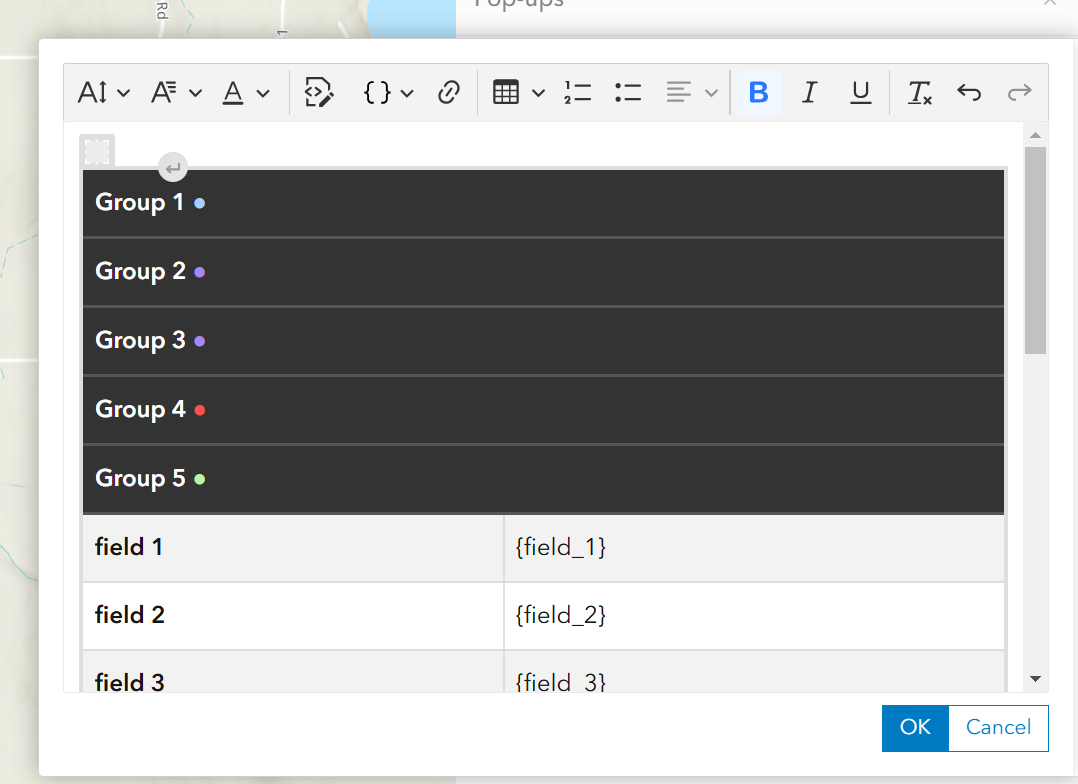
Resultados en el visor de mapas anterior: