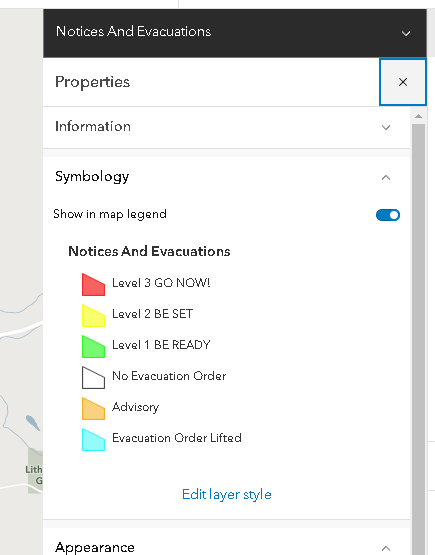
Estoy intentando averiguar por qué la simbología de mi capa no cambia cuando intento editarla en el visor de mapas de AGOL. Esta capa se creó con la Solución de operaciones de gestión de emergencias. Necesitaba personalizar la capa de avisos y evacuaciones para mi organización. Necesito que la simbología coincida y muestre las opciones personalizadas que elegí.Esta es la simbología de la capa
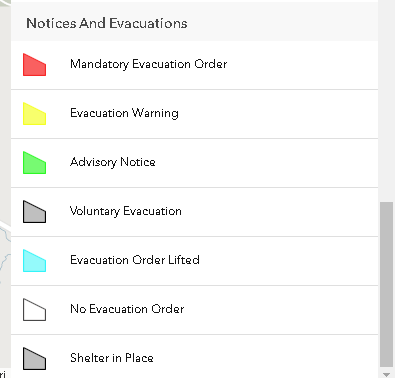
Esta es la simbología al editarla.
Hi @RickeyFight,
To update the choices in the Editor, you'll need to manage the feature templates. Support for managing feature templates within Map Viewer is on our future road map.In the mean time, you can use either Map Viewer Classic or the Field Maps Designer app.
To manage feature templates in the Field Maps Designer app, follow these steps:
Hope that helps!
@EmilyGeo Thank you for the help! I have not used Field Maps Designer.I am running into an issue on step 4. I do not see an 'Add Template' button.
I was able to change the template by using map viewer classic.
@EmilyGeo I their a webpage where we can track the current status of this new feature? Like Rickey, I have no option in Field Maps Designer to edit the existing template, or to create a new one.
Hi @BRENNEJM,
You should be able to manage templates for all layers that you own or administer. At this time, Templates can be managed in either Field maps or Map Viewer Classic.
To create a new template in Field Maps Designer, select an existing template and click the 'Duplicate' button, then update the attributes accordingly.
Los miembros que hayan iniciado sesión pueden publicar, seguir novedades y mucho más. ¿Eres nuevo por aquí? Regístrate gratis.
Find useful guides, FAQs, and documents to help you navigate and make the most of Esri Community.