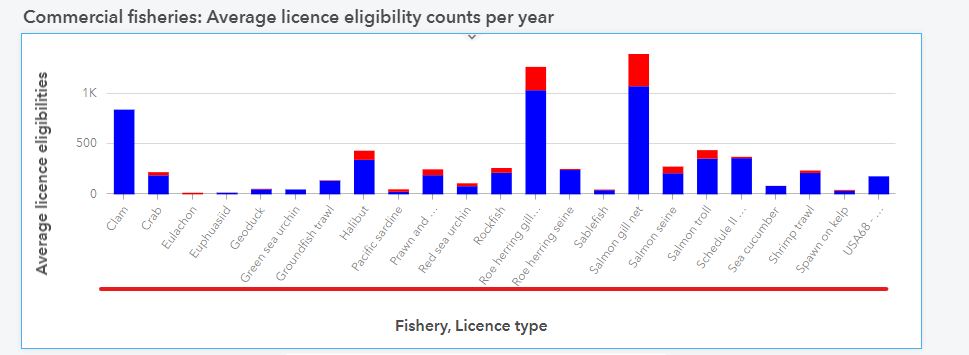
Developed with Insights Enterprise v2023.2, for the categories in following chart, any way to change the font size?
Based on the official documentation, it is accessible but tried both screen reader Narrator and JAWS none of them can read out the categories.
https://doc.arcgis.com/en/insights/latest/get-started/keyboard-shortcuts.htm
Thanks for any help!
@Ming From the information I got, this is handled by the charting library we use. So apparently 20 seems to be a limit but I couldn't find that in the documentation. Unfortunately, this doesn't help you much but it is something out of our control as well.
@Ming Thanks for the question. Unfortunately, there isn't a way to change the font on categories.
I was able to use Windows Narrator successfully on a Stacked bar chart using Win10 & Google Chrome. you want to use keyboard navigation ("Tab") button to navigate to a category and highlight. Let me know what browser and OS you are using and I can see if there is an issue.
Hi @AkshayHarshe,
Thank you very much for the response. I am also using Win10 & Google Chrome, but the Narrator reads all the chart as "Heading level one" not the category name like the select bar that should be read out as "Clam".
Ming
@Ming I don't hear that, For me it says the Category name. e.g. In my example, it says "<#> Wednesday Menu item"
I am using a newer update to Windows that yours, Maybe Narrator has some updates? See if you can download updates online.
This is my Chrome version
Let me know.
Thank you @AkshayHarshe,
Can you please try following one that I used to test?
https://insights.arcgis.com/#/view/5e1de41b1869414a95f38c4aeb96dd03
Then we can confirm it is caused by my OS/Chrome version or chart settings.
Thanks,
Got it, thank you @AkshayHarshe very much!
Los miembros registrados pueden publicar, seguir actualizaciones y más. ¿Nuevo aquí? Regístrate gratis.
Find useful guides, FAQs, and documents to help you navigate and make the most of Esri Community.