I have generated a .gpkx package using a custom tool that accepts a .lyr file as input and produces a layer as output. The tool runs successfully in ArcGIS Pro, and the .gpkx is created without any issues. However, when attempting to use the .gpkx in my WPF application through a local runtime server, the GeoprocessingJob encounters failures. Can anyone provide insights or suggestions on resolving this issue?
Actually I want to display Layers from .lyr file in my WPF application using ArcGIS Maps SDK.Net but as there is no direct way to load .lyr file in Maps SDK so I am trying to create a .gpkx to load layer using Local Server.
Follwoing is arcpy code from which .gpkx was generated
import arcpy
import os
def script_tool(inputlyrfile, inputprojectpath, outfolderpath, outputlyr):
arcpy.env.workspace = outfolderpath
projName = "mmpkproject"
projNamewithPath = os.path.join(outfolderpath, f"{projName}.aprx")
outmpkxfilepath = os.path.join(outfolderpath, "mpkxpackagefile.mpkx")
aprx = arcpy.mp.ArcGISProject(inputprojectpath)
newMap = aprx.createMap("mmpkmap", "Map")
insertLyr = arcpy.mp.LayerFile(inputlyrfile)
newMap.addLayer(insertLyr)
insertLyr.saveACopy(outputlyr)
del aprx
return
if __name__ == "__main__":
inputlyrfile = arcpy.GetParameterAsText(0)
outfolderpath = arcpy.GetParameterAsText(1)
inputprojectpath = arcpy.GetParameterAsText(2)
outputlyr = arcpy.GetParameterAsText(3)
script_tool(inputlyrfile, inputprojectpath, outfolderpath, outputlyr)
===============================================
Following are input/output parameters set in Tool properties
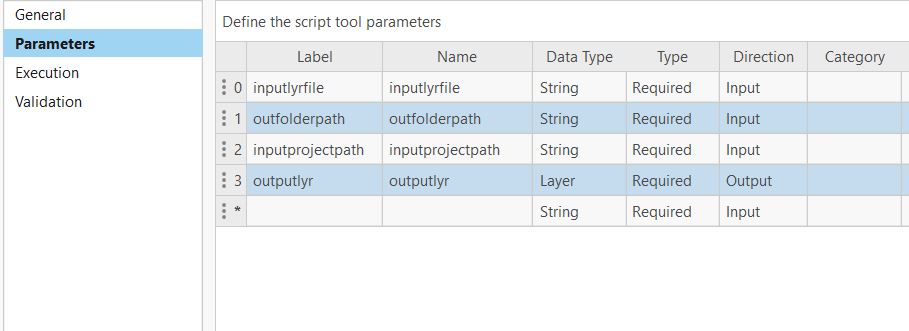
In my WPF application I am following the ArcGIS Maps sdk sample to consume the .gpkx using Local Server but GeoprocessingJob is failing.
private LocalGeoprocessingService _gpService;
private GeoprocessingTask _gpTask;
private GeoprocessingJob _gpJob;
private async void BtnGeoProcessing_Click(object sender, RoutedEventArgs e)
{
LocalServer.Instance.AppDataPath = "C:\\EsriSamples\\AppData";
await LocalServer.Instance.StartAsync();
_gpService = new LocalGeoprocessingService("path of .gpkx file", GeoprocessingServiceType.AsynchronousSubmitWithMapServiceResult);
_gpService.StatusChanged += GpServiceOnStatusChanged;
await _gpService.StartAsync();
}
private async void GpServiceOnStatusChanged(object sender, StatusChangedEventArgs statusChangedEventArgs)
{
if (statusChangedEventArgs.Status != LocalServerStatus.Started)
return;
try
{
string strUrl = _gpService.Url + "/myscripttool";
_gpTask = await GeoprocessingTask.CreateAsync(new Uri(strUrl));
RunJob();
}
catch (Exception ex)
{
MessageBox.Show(ex.Message);
}
}
private void RunJob()
{
GeoprocessingParameters gpParams = new GeoprocessingParameters(GeoprocessingExecutionType.AsynchronousSubmit);
string strInputLayer = "D:\\data\\input\\somelayer_LYR.lyr";
string strInputProjectFilePath = "D:\\data\\input\\templateproject\\templateproject.aprx";
string strOutFolder = "D:\\data";
gpParams.Inputs["inputlyrfile"] = new GeoprocessingString(strInputLayer);
gpParams.Inputs["outfolderpath"] = new GeoprocessingString(strOutFolder);
gpParams.Inputs["inputprojectpath"] = new GeoprocessingString(strInputProjectFilePath);
_gpJob = _gpTask.CreateJob(gpParams);
_gpJob.StatusChanged += GpJobOnJobChanged;
try
{
_gpJob.Start();
}
catch (Exception ex)
{
}
}
private async void GpJobOnJobChanged(object o, JobStatus e)
{
if (_gpJob.Status == JobStatus.Failed)// HERE JOB FAILS
{
MessageBox.Show("Job Failed");
return;
}
if (_gpJob.Status != JobStatus.Succeeded)
{ return; }
string gpServiceResultUrl = _gpService.Url.ToString();
string jobSegment = "MapServer/jobs/" + _gpJob.ServerJobId;
gpServiceResultUrl = gpServiceResultUrl.Replace("GPServer", jobSegment);
VM.LblStatus += Environment.NewLine + "Creating layer from job result ";
ArcGISMapImageLayer myMapImageLayer = new ArcGISMapImageLayer(new Uri(gpServiceResultUrl));
try
{
await myMapImageLayer.LoadAsync();
Dispatcher.Invoke(() =>
{
MainMapView.Map.OperationalLayers.Add(myMapImageLayer);
});
}
catch (Exception ex)
{
}
}

