Hy,
I encounter a problem when using a python / arcpy script in FME, from a PythonCaller.
Some arcpy instruction does not work in FME, for example :
- arcpy.Exists ==> return feature class does not exist ;
- arcpy.CopyFeatures_management ==> fails with following explanation feature class does not exist.
However, in ArcGIS Desktop it works (feature class exist) :

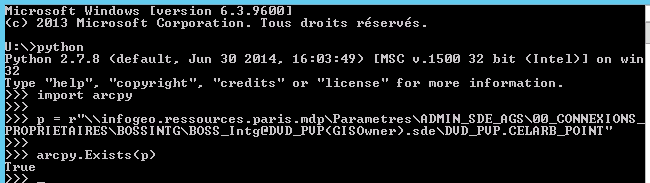
However, in python it works (feature class exist) :
Here is the code contained in FME :
# Import system library
import sys
reload(sys)
sys.setdefaultencoding('utf-8')
# Import arcpy librairy for FME
agdArcpyPath = r'C:\Program Files (x86)\ArcGIS\Desktop10.3\arcpy'
agdBinPath=r'C:\Program Files (x86)\ArcGIS\Desktop10.3\bin'
if agdBinPathnot in sys.path:
sys.path.append(agdBinPath)
if agdArcpyPath not in sys.path:
sys.path.append(agdArcpyPath )
import arcpy
# Workflow
fcPath= r"\\infogeo.ressources.paris.mdp\Parametres\ADMIN_SDE_AGS\00_CONNEXIONS_PROPRIETAIRES\BOSSINTG\BOSS_Intg@DVD_PVP(GISOwner).sde\DVD_PVP.CELARB_POINT"
if arcpy.Exists(fcPath): # Problem, it return False in FME
# Execute workflow
pass
#end if
For information here is the technical background :
- ArcGIS Desktop 10.3.1 French
- FME 2016.1
Has anyone ever succeeded in integrating some python/arcpy code into FME?
Do you have an idea to solve my problem?
Thank you for your help.
Flavie