Hello,
I would like to filter data in a Dashboard List element to display only unique attribute values.
The dataset looks something like this:
| Site | Year | Species | Count | latitude | longitude |
| S1 | 2019 | Sp1 | 124 | 83.27315 | -100.353 |
| S1 | 2018 | Sp2 | 120 | 83.27315 | -100.353 |
| S1 | 2020 | Sp2 | 8 | 83.27315 | -100.353 |
| S1 | 2020 | Sp3 | 1 | 83.27315 | -100.353 |
| S2 | 2018 | Sp1 | 86 | 63.27315 | -100.359 |
| S2 | 2021 | Sp1 | 1 | 63.27308 | -100.359 |
| S3 | 2019 | Sp1 | 26 | 83.234 | -100.675 |
| S3 | 2018 | Sp1 | 25 | 83.234 | -100.675 |
| S3 | 2020 | Sp4 | 40 | 83.234 | -100.675 |
| S4 | 2021 | Sp1 | 50 | 56.001 | -112.675 |
I would like the List element to only display unique Site values (S1, S2, S3, S4). I need to keep the Year and Species attributes for Category Selector filters (to decrease the list based on those selectors), so doing the filtering upstream in Data Expression won't work.
I'm thinking I need to use the Distinct function but I'm not sure if:
1) this type of filtering is allowed at all in Advanced Formatting, and
2) how to call the values returned from the Distinct function in List>List options
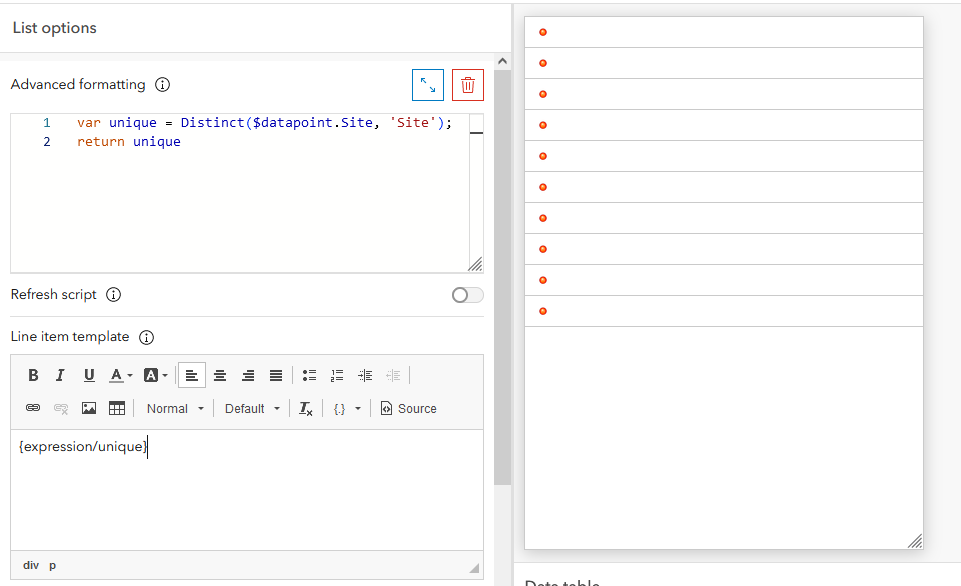
Esri tutorials about Advanced Formatting for Lists are usually about visualizing data (not filtering it), and all the answers I can find in this forum on filtering unique/duplicate values relate to Data Expression.
Any help is appreciated.


