Hello,
I was originally on 4.11 and updated to 4.26 and noticed that the when displaying field attribute values it no longer renders HTML as expected. I did some Googling and saw that this is expected due to the added sanitize feature. I was able to fix up some of my popup HTML content using CustomContent, but I'm stuck on the FieldInfo portion for FieldsContent.
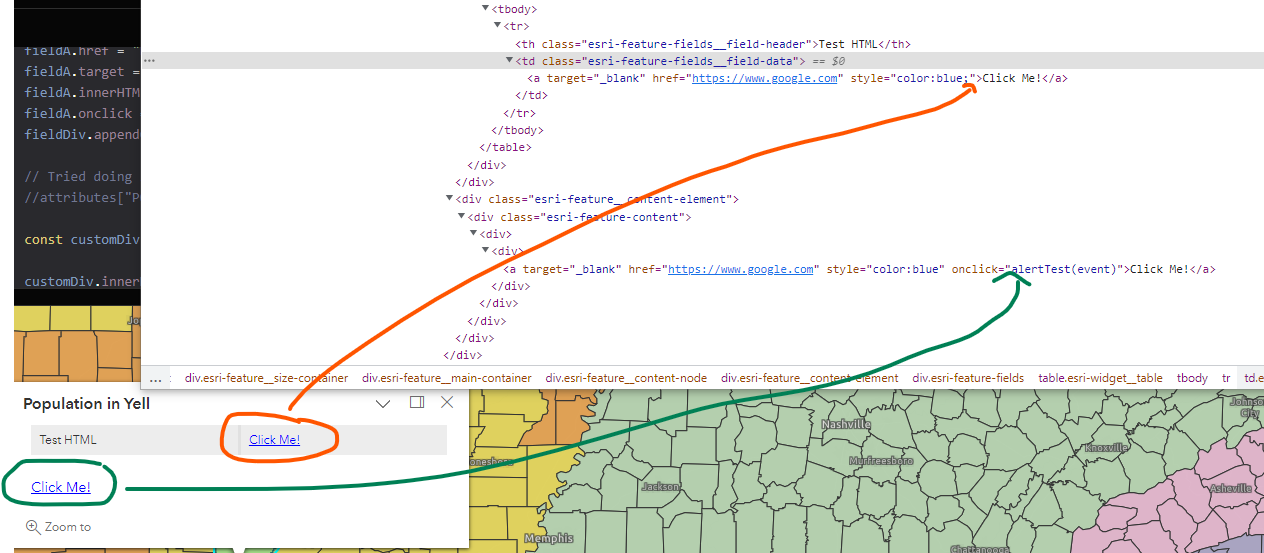
Below is my sample code. I was able to use CustomContent to display the HTML as expected, but not getting same outcome with Fields for onclick in populationChange function.
<html lang="en">
  <head>
    <meta http-equiv="Content-Type" content="text/html; charset=utf-8" />
    <meta
      name="viewport"
      content="initial-scale=1, maximum-scale=1,user-scalable=no"
    />
    <link
      rel="stylesheet"
      href="https://js.arcgis.com/4.26/esri/themes/light/main.css"
    />
    <script src="https://js.arcgis.com/4.26/"></script>
    <script>
      function alertTest(e) {
        e.preventDefault();
        alert("test");
      }
    </script>
    <style>
      html,
      body,
      #viewDiv {
        padding: 0;
        margin: 0;
        height: 100%;
        width: 100%;
      }
    </style>

    <script>
      let populationChange;
      require([
        "esri/Map",
        "esri/views/MapView",
        "esri/layers/Layer",
        "esri/popup/content/FieldsContent",
        "esri/popup/content/CustomContent",
        "esri/popup/FieldInfo"
      ], (Map, MapView, Layer, FieldsContent, CustomContent, FieldInfo) => {
        const map = new Map({
          basemap: "dark-gray-vector"
        });

        // Create the MapView
        const view = new MapView({
          container: "viewDiv",
          map: map,
          zoom: 6,
          center: [-87, 34]
        });

        Layer.fromPortalItem({
          portalItem: {
            // autocasts as new PortalItem()
            id: "e8f85b4982a24210b9c8aa20ba4e1bf7"
          }
        }).then((layer) => {
          // add the layer to the map
          map.add(layer);

          const popupTemplate = {
            // autocasts as new PopupTemplate()
            title: "Population in {NAME}",
            outFields: ["*"],
            content: populationChange,
          };

          layer.popupTemplate = popupTemplate;

          function populationChange(feature) {
            let fieldInfo1 = new FieldInfo({
              fieldName: "POP2013",
              label: "Test HTML",
              visible: true
            });

            const attributes = feature.graphic.attributes;

            const fieldDiv = document.createElement("div");
            const fieldA = document.createElement("a");
            fieldA.href = "https://www.google.com";
            fieldA.target = "_blank";
            fieldA.innerHTML = "Click me!";
            fieldA.onclick = "alertTest(event)";
            fieldDiv.appendChild(fieldA);

            // Tried doing something like this for the field but still no luck
            //attributes["POP2013"] = fieldDiv.innerHTML;

            const customDiv = document.createElement("div");

            customDiv.innerHTML = "<a target='_blank' href='https://www.google.com' style='color:blue' onclick='alertTest(event)'>Click Me!</a>";

            // I also tried just assigning customDiv object but that just renders text [object HTMLDivElement]
            attributes["POP2013"] = customDiv.innerHTML;

            let fieldsElement = new FieldsContent({
              fieldInfos: [fieldInfo1]
            });


            let customContent = new CustomContent({ creator: customDiv });

            return [fieldsElement, customContent];
          }
        });
      });
    </script>
  </head>
  <body>
    <div id="viewDiv"></div>
  </body>
</html>

