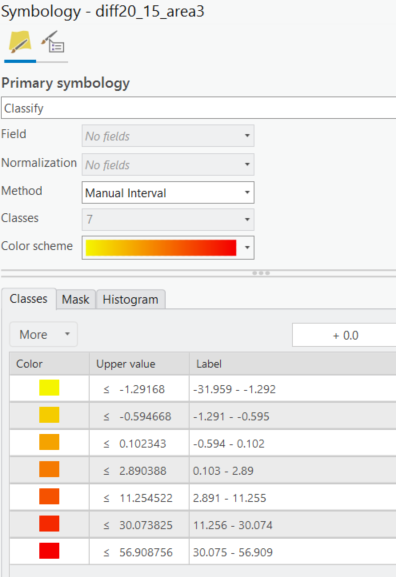
As the title says I want to update break values via the CIM (preferably). Ultimately I need to develop the skillset to update the break values of rasters in an Arc Pro map based off of different distributions and numbers of breakpoints. I am struggling to understand the CIM, particularly with rasters. I am very experienced using Python - looping, conditional statements, data types, and indexing of different data models (lists, arrays, etc.). Can somebody pretend they are me they have an existing map with a raster stretch symbology and 7 classes. How do I replace these with the values in this list and update the layer?
p = arcpy.mp.ArcGISProject(r'path/to/aprx')
m = p.listMaps("Map")[0]
l =  m.listLayers(r"raster_layer")[0]
symb = l.symbology
break_vals = [-3,-2,-1,0,2,4,6]
# 7 break points
symb.break_vals = 7
for idx, brk in enumerate(symb.colorizer.classBreaks):
  brk.upperBound = break_vals(idx)

# Do I have to save a copy?  Why not set definition as with l.getDefinition('V2')
p.saveACopy('path/to/aprx_copy.aprx') Note that I haven't been able to execute this yet because the colorizer property in my layer does not have a classBreaks attribute for some reason? So line 9 (brk.upperBound) generates an Error.
AttributeError: 'RasterStretchColorizer' object has no attribute 'classBreaks'
Symbology Properties from the raster in my TOC. It's a File Geodatabase Raster
I am loosely following the second code sample here:
https://pro.arcgis.com/en/pro-app/latest/arcpy/mapping/rasterclassifycolorizer-class.htm
Thanks - Zach

